

















































































Headless commerce separates the storefront shoppers see from the database and software that process their orders. In web and e-commerce development, application programming interfaces (APIs) let those separate systems exchange product data and transactions. For retailers around the peninsula, this means fewer design limits than older storefronts impose, while catalog management stays organized.
Traditional commerce software ties design templates directly to database tables. Updating a promotional layout or changing checkout steps can mean editing rigid template files, which slows down everyday work. Separating the storefront from the back end gives merchants full control over what shoppers see on phones, kiosks, and desktop screens.
What’s Inside This Guide
- Deconstructing the Architecture: Front-End Freedom Meets Back-End Power
- The API Bridge: How Data Moves in a Decoupled Store
- Decoupled Storefronts vs All-in-One Systems and Plugin Builds
- Architectural Pathways for Local Retailers and Catalogs
- Evaluating Fit: When Decoupling Makes Commercial Sense
- Long-Term System Health and Pipeline Care
- Unpacking Common Headless Inquiries
- Building Modern Commerce Foundations with Prozco Branding
Deconstructing the Architecture: Front-End Freedom Meets Back-End Power
Every online shop has two main jobs: showing products clearly and processing orders securely. A headless store handles those jobs with separate software systems that communicate through standard web connections.
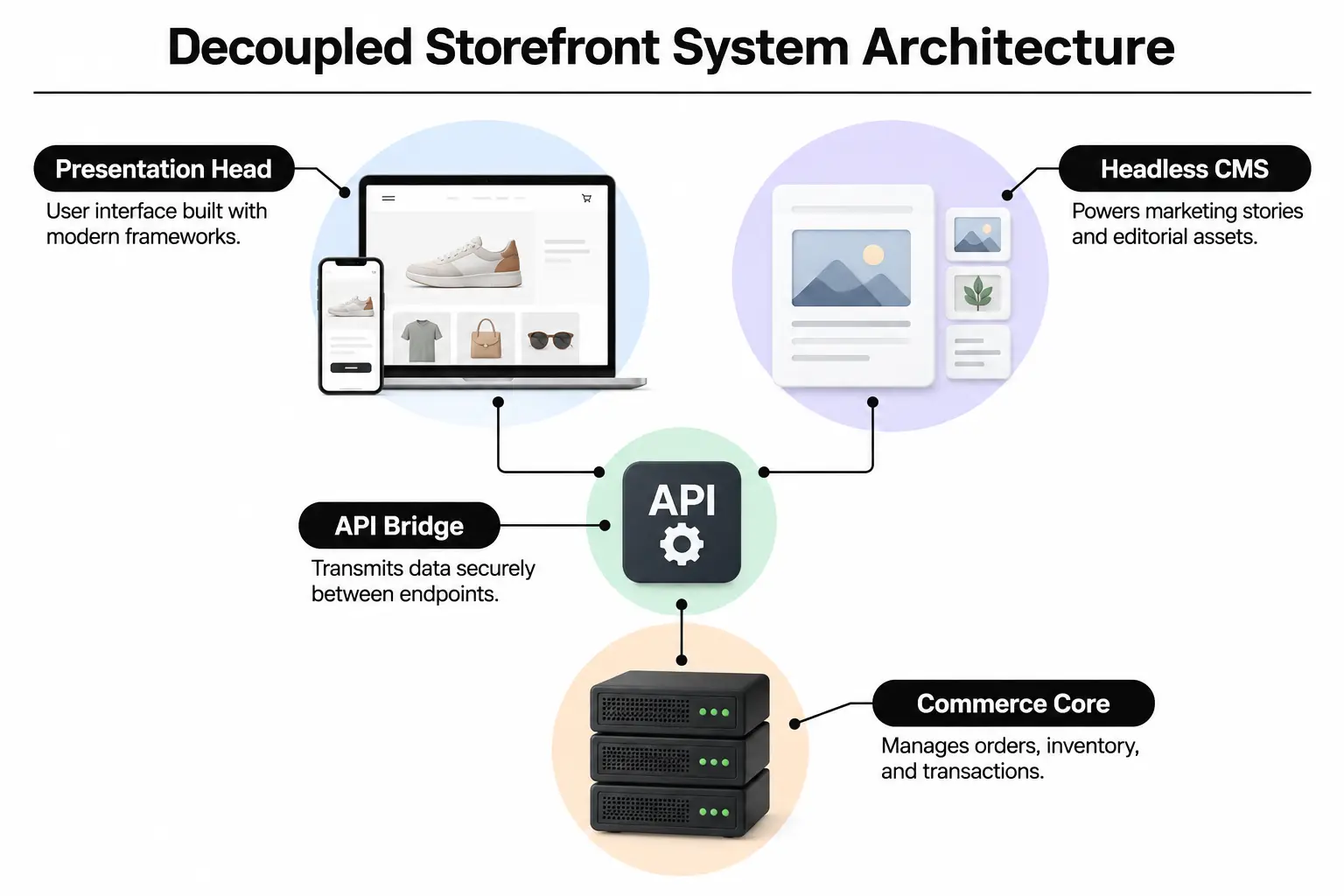
- Presentation Head: This is the storefront shoppers see. Frameworks such as Next.js or Nuxt support fast screen loads and designs that adapt to different screens.
- Application Programming Interface: An API carries requests between systems, including product searches and cart additions. It also passes customer login details through structured data requests.
- Commerce Engine: This back-end software keeps inventory in sync and handles payment approvals. Shipping rules and tax calculations also live here.
- Content Management Layer: Editors use this shared workspace to update campaign banners, journals, and local stories without changing product code.
Marketing teams can publish brand stories through custom WordPress sites while dedicated commerce software processes orders. Our notes on desktops, notebooks and handheld devices also explain how hardware communicates across networks where the work happens in separate systems.
The API Bridge: How Data Moves in a Decoupled Store
A shopper in Rancho Palos Verdes taps a product card, and the browser requests static files from a nearby edge server. Those files display instantly without waiting for a database to build page templates. Clicking “Add to Cart” sends a small JavaScript request straight to the commerce software through an API endpoint, its designated connection address.
Video: Znode explains headless, monolithic, and composable commerce
Back-end software checks stock and adjusts prices, then returns data in a structured format called JSON. The storefront updates the cart counter without reloading the page. Payment gateways send credit card tokens, which stand in for card details, over encrypted connections that meet payment card security standards.
The State Synchronization Hurdle
Businesses often overlook state management: keeping carts, customer sessions, and inventory in agreement. Separate systems must stay aligned even when a connection drops. Someone might add an item on Hawthorne Boulevard, then check their cart at home. Your API must compare stored data with live stock counts so that shopper cannot buy an out-of-stock item.
Decoupled Storefronts vs All-in-One Systems and Plugin Builds
Store owners usually choose between an all-in-one platform, a content management plugin, or a separate storefront and back end. Each choice changes how much work the initial build takes and how much control you have once the store is running.
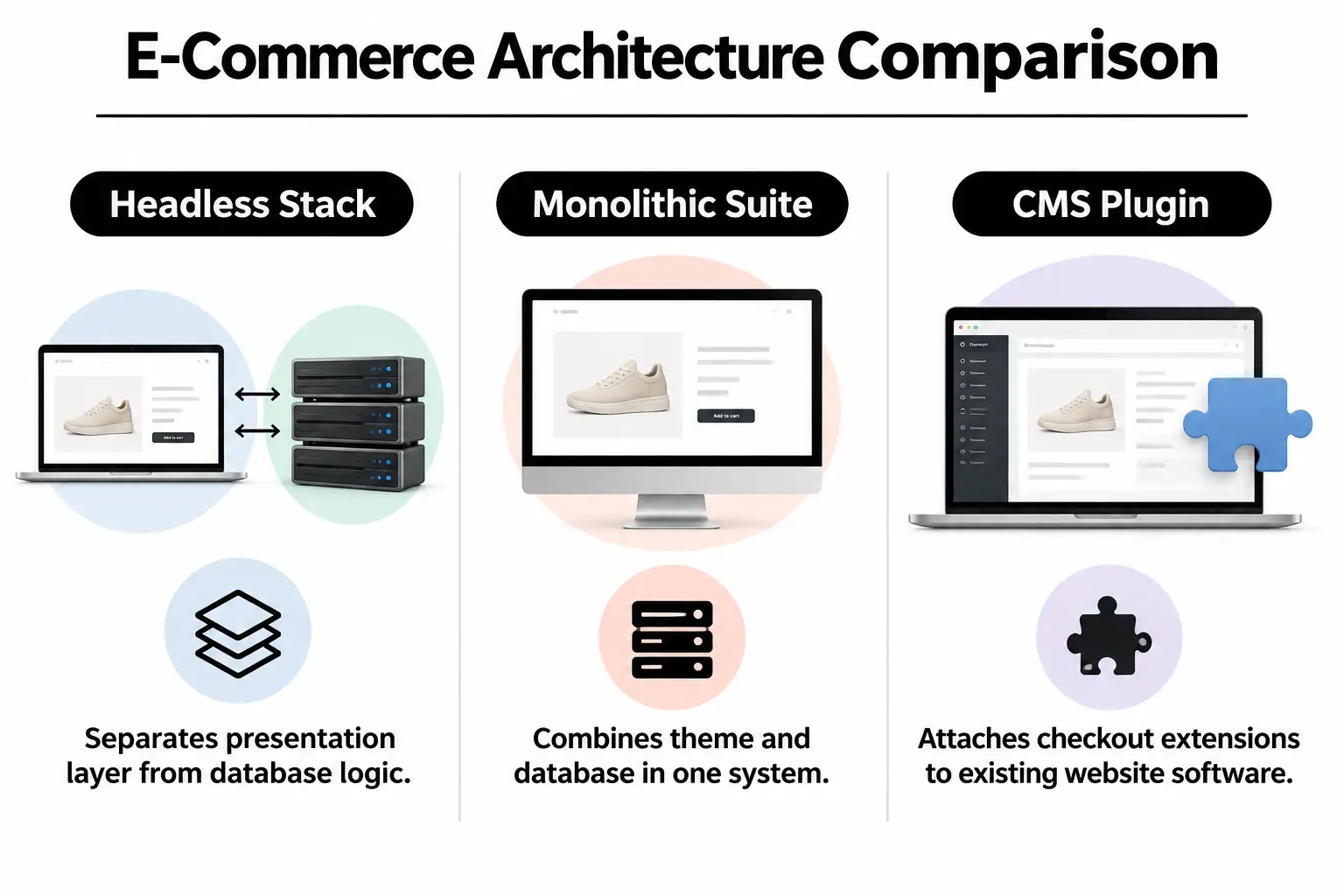
| Platform architecture | Design flexibility | Maintenance needs | Initial setup work | Relative cost |
|---|---|---|---|---|
| Decoupled / headless | Full control over interface design | Separate software services need management | Extensive engineering required | $$$ |
| Monolithic / all-in-one platform | Limited by the theme system | Vendor maintains the core software | Low to moderate template setup | $ |
| Content management system with plugins | Moderate template flexibility | Plugins need regular updates | Moderate initial setup | $$ |
All-in-one platforms tie design themes directly to the application server. Enterprise stores with heavily customized catalogs can take a different route. We can configure platforms using Magento 2 or specialized WordPress development as headless sources, sending product data straight to a custom storefront.
Architectural Pathways for Local Retailers and Catalogs
There is no single required set of headless tools. Your catalog size and your developers’ skills help determine which setup makes sense:
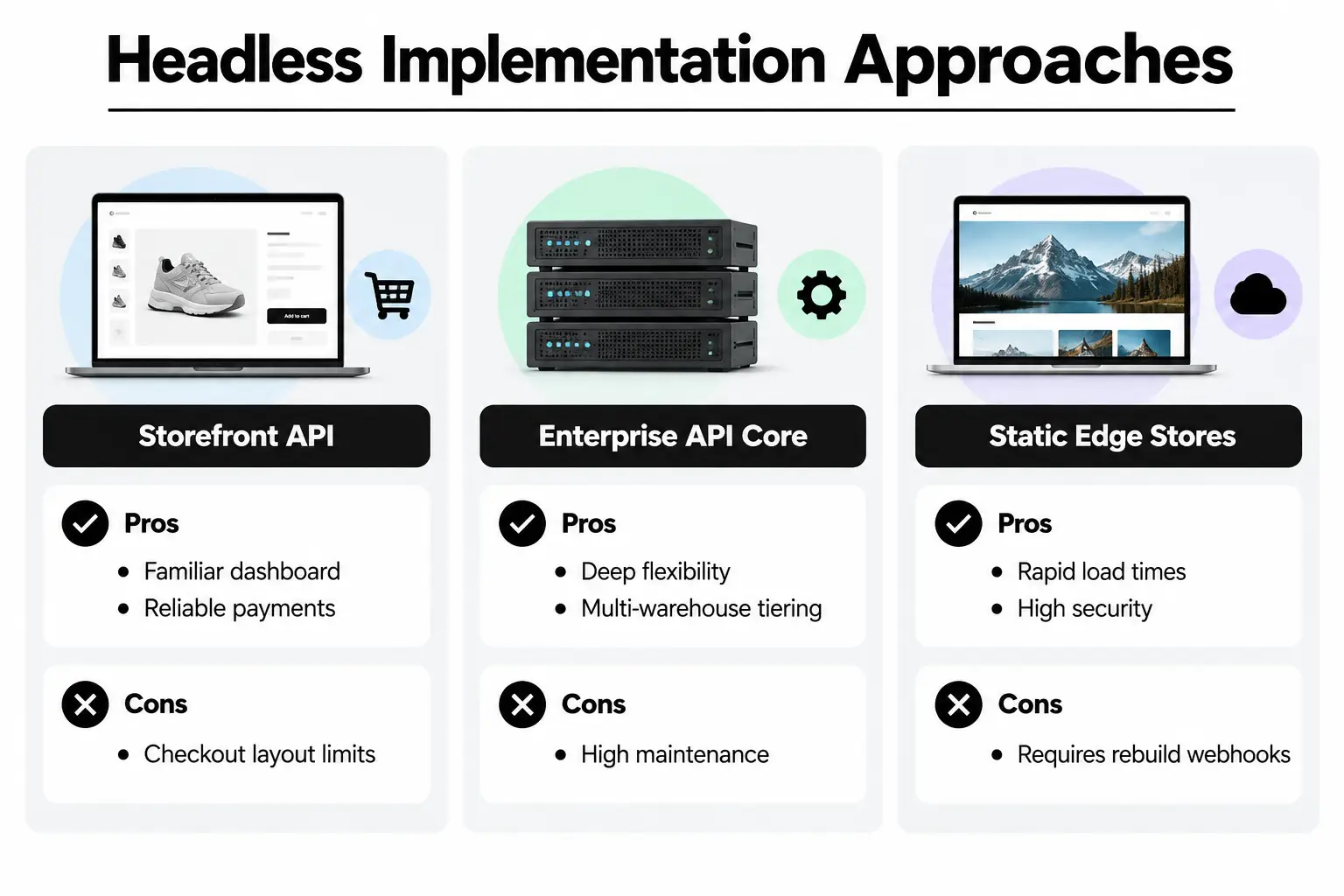
- Shopify Storefront API with a custom front end: Connects a dependable payment checkout to your own storefront design. You keep familiar inventory workflows. The trade-off is checkout styling: vendor rules still apply unless you use advanced enterprise tiers.
- Enterprise Magento API core: Supports complex products, multiple warehouses, and wholesale price tiers through a separate storefront. Its database offers unmatched flexibility for business-to-business ordering. That control comes with dedicated hosting requirements and regular server maintenance.
- Static headless generators: Build catalog pages ahead of time and serve them through global content delivery networks, which distribute files across servers. Pages load almost instantly. Partial updates depend on reliable webhooks, automated notices that trigger the publishing process.
Your choice of tools also depends on how quickly marketing needs to publish changes. If your current setup is getting in the way, schedule a technical consultation with our team. We can review what your system needs to support.
Evaluating Fit: When Decoupling Makes Commercial Sense
Headless stores offer considerable freedom, but that does not make them right for every local business. Compare the scale of your operations with the extra development work before separating the storefront from the back end.
| Business situation | Recommended setup | Main risk | Operational priority |
|---|---|---|---|
| Boutique with under 50 items | All-in-one storefront | Making simple tasks too complex | Focus on photography and clear descriptions |
| Local merchant selling across channels | Headless commerce setup | Failed API connections | Keep inventory consistent across sales channels |
| Content-driven lifestyle brand | Separate content system and cart API | Complicated content previews | Publish quickly without technical delays |
| High-volume wholesale distributor | Separate enterprise resource planning system / custom API | Longer rollout schedules | Automate customer price tiers and stock updates |
Our rule: Do not build a headless store because the term is popular. Separate the systems only when you can show that theme limits hold back conversion rates or slow pages on mobile networks.
Long-Term System Health and Pipeline Care
Separate systems mean more parts to maintain. Rather than looking after one application, your team manages browser software and the connections to back-end databases. Ongoing website maintenance keeps those parts working together as software versions change.
Essential Operational Checks
- API connection checks: Review response headers, the information sent with replies, and authentication tokens that prove access rights. Check data response times monthly to catch slowdowns early.
- Core Web Vitals monitoring: Track cumulative layout shift, which measures unexpected page movement, and largest contentful paint, which measures main-content loading time. Google Web Dev Metrics documents both.
- Webhook delivery logs: Confirm that inventory changes and order status updates reach the other systems. Check that customer profile edits arrive without being dropped.
- Security key rotation: Refresh API authorization tokens every 90 days to prevent unauthorized access to back-end systems.
Regular care prevents broken checkout buttons and missing cart notices. For more on current approaches to store systems, read our engineering blog.
Unpacking Common Headless Inquiries
Will headless commerce hurt search engine rankings?
No, as long as the server builds your pages in advance or on request, rather than leaving that work entirely to the browser. Search crawlers can immediately read the finished HTML, including page details, structured data, and content.
Is headless commerce noticeably faster than traditional stores?
Yes, because the storefront downloads small JSON data files instead of rebuilding full HTML templates for every page view. Content delivery networks serve pages quickly from servers close to peninsula shoppers.
Does moving to headless require abandoning our current product database?
Most modern commerce platforms provide headless APIs that connect directly to your existing catalog, so you do not need to abandon it. Staff can keep managing products in Shopify or Magento while those systems send data to a separate storefront.
Why does headless development cost more to build initially?
Engineers build two separate systems rather than style one all-in-one template. API connections and cart tracking need specialized programming on both sides. Testing the separate payment workflows adds work too.
How do marketing teams update promotional banners without developers?
Editors manage text and images in a headless content management system, or CMS. Publishing sends an automated webhook notice to the storefront application, which displays the new promotion immediately.
Building Modern Commerce Foundations with Prozco Branding
At Prozco Branding, we start with what your business needs the store to do. Those requirements guide the technical choices that shape your online sales growth. From our studio on Seagate Drive in Rancho Palos Verdes, we build web systems that can grow with your business and fit your catalog structure.
Before you commit to moving your store, work through this readiness checklist:
- Performance benchmarks: Record current mobile load times so you can set measurable targets for the new store.
- Catalog complexity: Count product variants and custom bundles, along with regional tax variations your system must handle.
- Team workflows: Identify who edits content and who handles fulfillment. Mark the steps where work gets held up.
- Integration audit: List every third-party app and analytics script, plus any enterprise resource planning tools used to manage business operations.
- Ongoing resource commitment: Set aside a budget for testing the publishing process and checking that API connections keep working.
To review your store plans with Prozco Branding, call our local office at (310) 571-5533 or contact our technical team.