
















































































For most businesses, a progressive web application (PWA) is the faster, more practical choice this year. Your ecommerce setup matters: headless Magento development separates the storefront from the systems behind it, giving you a flexible base for mobile sales. Our fragrance project offers related context.
Unless your product needs heavy background computing or advanced device sensors, a modern web app offers comparable speed. It also avoids store commissions and separate codebases. Constant Bluetooth checks are another reason to consider native software instead.
The choice changes if you need instant device responses or close ties to the operating system. App store discovery can also matter if it brings in most of your customers. A native application remains necessary for hardware access or offline processing that browser security rules still restrict.
What’s Inside This Guide
- The Costly Trap of Defaulting to App Store Builds
- Evaluating Hardware Access Against Distribution Friction
- Matching Architecture to Your Specific Commercial Model
- Integrating Your Mobile Interface With Core Backend Systems
- Execution Milestones for a Stable Mobile Deployment
- Allocating Your Capital Across Launch and Maintenance
- Practical Questions Rancho Palos Verdes Teams Face
- Planning Your Mobile Roadmap in Rancho Palos Verdes
The Costly Trap of Defaulting to App Store Builds
Many businesses waste tens of thousands of dollars on separate iOS and Android builds because they think an app store listing adds credibility. Customers must find the app, download it, then approve permissions. Someone who finds you through local search or a recommendation may leave rather than download an app just to check out.

Separate Swift and Kotlin codebases divide your developers’ attention. Each security patch or design change needs work in both environments, as do updates to APIs, the connections between systems. Late updates can break checkout and damage the credibility your branding agency helped you build.
Practical check: Do not build a native app if typical customers will open it fewer than three times a week. Requiring a download will undermine retention before you launch.
At Prozco Branding, we see companies underestimate the ongoing work that app store rules create. Store reviews can delay critical security fixes for days, frustrating customers and holding up business operations.
Evaluating Hardware Access Against Distribution Friction
Software choices affect how easily buyers reach checkout. PWAs use ordinary URLs that search engines can index and people can share. Customers can install them from the web onto their home screens. They store files locally under the service worker standards, while native apps must meet store rules and mandatory platform updates.
Video: Comparing PWA and native app builds in 2025 (ScalaCode™)
Complex Magento setups can supply either type of app through GraphQL, a way to request data without changing the product database. Without a need for direct sensor access, store approvals add a barrier between marketing and sales. To discuss your platform setup, reach our engineering team directly.
Comparing Platform Capabilities and Core Trade-Offs
| Option | Recommended starting point | What to watch |
|---|---|---|
| Progressive web app (PWA) | Modern web storefronts with a separate backend | Apple WebKit limits on background syncing in iOS |
| Native iOS & Android | Utility tools that depend on sensors | Annual developer accounts and repeated store review delays |
| Hybrid / cross-platform | Internal dashboards for enterprise staff | Plugins falling behind major operating system updates |
Checking these limits early keeps you from spending your budget on the wrong build. The browser documentation describes hardware support on modern devices. Current PWAs reliably support camera access and location services, along with push notifications.
Matching Architecture to Your Specific Commercial Model
A local service firm or luxury boutique in Rancho Palos Verdes, CA needs customers to reach bookings and catalogs quickly. Asking those customers to install an app first reduces inquiries. That trade-off matters more than having a presence in an app store.
Media platforms and frequently used messaging services have stronger reasons to go native. Their users expect background syncing and biometric logins backed by secure key storage, along with detailed vibration feedback. Careful UI and UX design, covering the interface and how people use it, makes either option work as customers expect.
| Situation or style | Recommended choice | Avoid |
|---|---|---|
| Direct-to-consumer retail & catalog browsing | Headless PWA that stores content for offline use | Making first-time shoppers download an app |
| Connected hardware & continuous device data | Native Swift and Kotlin build | Browser-based wrappers that lose background connections |
| Appointment scheduling & local customer portals | Web app with a service worker for background tasks | Separate codebases that inflate ongoing running costs |
| Enterprise field-service logging | Cross-platform progressive build | Desktop software that does not adapt to phones |
Architect’s rule: Never build a native app to fix low engagement. Customers who ignore your mobile website will not start using the same content because you put it behind an app download.
Integrating Your Mobile Interface With Core Backend Systems
Customer-facing screens depend on the software behind them. Both a lightweight PWA and a native app draw from the same databases and payment systems. They also use your content management system. Keeping these connections working prevents abandoned carts and stock counts that fall out of sync.
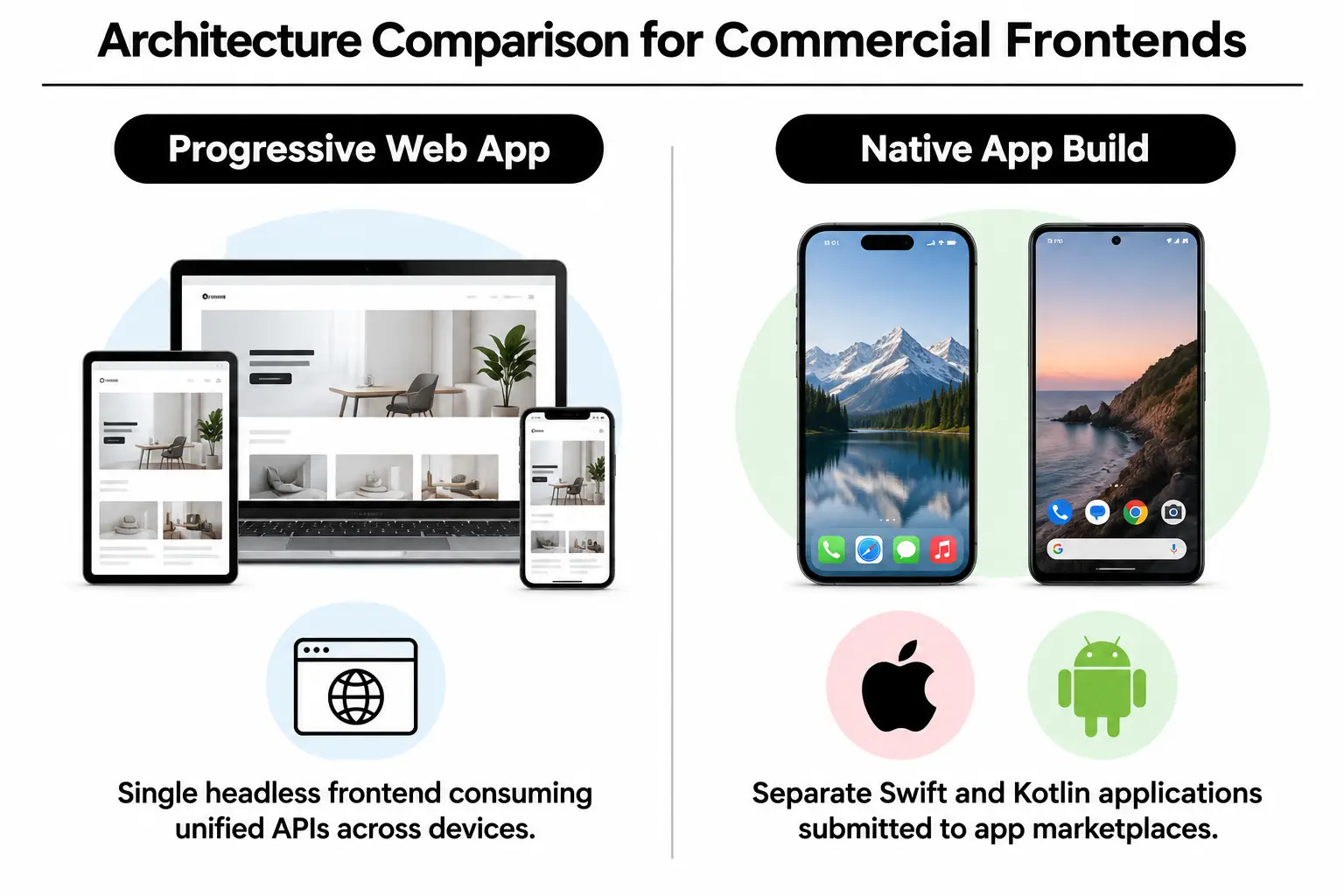
We connect these interfaces through tailored Magento 2 web design or small, separate backend services, including existing custom product configurators. Separating the interface also lets publishers reuse structured content from corporate blog design work without custom tools to extract it. Our technical posts regularly cover these changes.
| Starting point | Pairing direction | What to sample or test | Intended effect |
|---|---|---|---|
| Enterprise Magento store | Headless PWA supplied through GraphQL | Whether carts survive a dropped connection | Mobile checkout responses in under a second |
| Custom WordPress websites | REST data connection with service worker caching | Opening saved articles offline | Instant content delivery that keeps local readers coming back |
| Custom inventory API | Connection through a native software development kit | Speed during continuous barcode scanning | Fast catalog checks in warehouses or the field |
| High-touch luxury catalog | Progressive media storefront | File compression on mobile connections | Consistent presentation matching our luxury fragrance project |
Our look at hardware capabilities across handhelds helps explain how browsers and native software use memory differently. Modern mobile browsers have more than enough processing power for most shopping and booking tasks.
Execution Milestones for a Stable Mobile Deployment
Before launch, test the interface and decide what it should do when the connection weakens. Skipping either step leads to bad reviews and abandoned carts. These checks belong in the build plan, not on a list of things to fix after release.
- Map essential hardware touchpoints: Record the connected equipment and sensors your app needs, including its storage requirements. Remove anything that is not essential to completing a transaction.
- Standardize API schemas: Give your data connections a consistent format through REST or GraphQL, using compact JSON data files. Process images before delivery so phones do not download uncompressed originals.
- Implement caching service workers: Use libraries such as Google Workbox to manage locally saved files, following the caching documentation. Pages should appear immediately even when the mobile signal briefly drops.
- Conduct responsive stress testing: Check the interface at different screen sizes and test how easily people can tap its controls. Include accessibility checks so the design remains usable.
- Configure continuous telemetry: Monitor downloaded code sizes and page loading times. Track checkout response times too, so you catch slowdowns before customers notice them.
Deployment check: Never release a PWA without a basic screen that works offline. During a loss of reception, it should direct customers to saved items instead of leaving them on a browser error page.
Put these checks into your regular website maintenance schedule to protect the work you have paid for and keep software updates from interrupting customer activity.
Allocating Your Capital Across Launch and Maintenance
Initial development is only part of the bill. Native apps bring annual developer program fees and required updates to platform development tools. Every release also needs separate quality checks for each platform. PWAs use the web hosting infrastructure you already have.
For a custom Magento store, money spent speeding up data connections produces more conversions than custom iOS display details. Faster servers and a better-performing database help desktop visitors as well as mobile shoppers. That investment works across both channels rather than serving one version of your app.
| Budget level | What to prioritise | What to question |
|---|---|---|
| Modest ($) | Responsive PWA tuned for speed on existing web hosting | Native store builds that double development and review costs |
| Growing ($$) | Separate frontend and backend, with advanced caching and custom user experience design | Proprietary app builders that take a recurring monthly cut |
| Enterprise ($$$) | Small API services built for many simultaneous requests, with device-specific tuning | Duplicate native apps for catalogs that work the same way in browsers |
Extra spending makes sense if it simplifies checkout or improves digital marketing attribution, so you can see which efforts lead to sales. Funding two separate native apps rarely gives regional businesses a return that matches the added cost.
Practical Questions Rancho Palos Verdes Teams Face
Can an iPhone user install a PWA easily without the App Store?
Yes. On an Apple device, tap the Share icon in Safari, then select Add to Home Screen. The installed PWA opens full-screen with its own icon and no browser navigation bars. Updates sent to your server take effect immediately, without an app store review.
Do progressive web apps support push notifications on Apple devices?
Since iOS 16.4, Apple WebKit has supported push notifications for web apps installed on the home screen. People must give permission, just as they do with native iOS apps. Implementation details appear in updates on the WebKit developer blog.
How do PWAs compare to native builds for search engine indexing?
Search engines can crawl and rank PWA pages through ordinary URLs, just as they do with other websites. Native app content cannot be indexed directly in the same way. It needs dedicated deep links, which connect search traffic to app store listings.
Will our existing backend support a modern progressive web app?
Existing ecommerce APIs can connect directly to a PWA, making modern Magento development a good fit for quick browser-based installation. Custom WordPress sites can support a fully separate PWA interface through REST or GraphQL data connections. You do not need to replace the system used to manage your content.
When is a native mobile app truly worth the additional expense?
Native development earns its cost when the product depends on continuous background processing or direct device sensor access. Communication with physical hardware through native Bluetooth is another reason. Primarily informational sites, service businesses and retailers can meet their needs with a PWA at a fraction of the cost.
Planning Your Mobile Roadmap in Rancho Palos Verdes
Choosing the architecture early helps avoid costly rewrites and protects your marketing budget. At Prozco Branding, we help businesses plan software around commercial needs rather than unnecessary engineering work. Before you commit money to a mobile build, check these points:
- Audit hardware requirements: Confirm which features need direct native hardware access and which can use the connections already available in a browser.
- Calculate ongoing maintenance: Include developer salaries for both codebases and the annual fees required to keep your apps in the stores.
- Assess customer acquisition: Decide whether new buyers will complete a multi-step app download before making their first purchase.
- Evaluate current infrastructure: Check whether your ecommerce backend can already supply data through APIs to a separate mobile interface.
- Review offline dependencies: List the files and account details customers need to reach when they have no cellular reception.
Get in touch with Prozco Branding to schedule a detailed architecture review with our engineers in Rancho Palos Verdes, CA.