


















































































To keep WordPress fast while meeting California privacy requirements, keep consent checks from blocking the page as it loads. Tools used to meet the state’s consumer privacy requirements can slow rendering when their scripts run before page content. Heavy cookie banners and tracking blockers hurt Core Web Vitals, Google’s measures of page experience.
At Prozco Branding, we use disciplined app development practices to separate consent blocking from the browser’s main processing work. Legal compliance should not come at the cost of load speed.
Most slowdowns start with poorly configured banner tags running before the browser displays basic page styles. Mobile visitors leave before consent dialogs even appear when legal scripts take priority over content. Fixing this means changing how data moves through your site and removing unused tracking libraries, with leaner code for custom WordPress websites.
What’s Inside This Guide
- Clear Warnings That Privacy Tools Are Stalling Your Store
- Tracking Script Conflicts and Consent Banner Latency
- Safe Adjustments to Recover Lost Milliseconds
- When Custom Data Architecture Demands Senior Engineers
- Routine Steps to Maintain Speed and Legal Hygiene
- Technical Questions on Privacy Script Optimization
- Audit and Accelerate Your Compliance Stack in California
Clear Warnings That Privacy Tools Are Stalling Your Store
Visitors should still be able to use your site while privacy tools run. Poorly loaded banners delay clicks, making forms harder to complete and catalogs harder to browse. High bounce rates on landing pages serving Los Angeles or San Francisco often point to script delays as the main cause.

- Long Total Blocking Time: Consent tools hold up clicks for more than 300 milliseconds while checking a visitor’s consent status.
- Layout Shifts on Interaction: Privacy bars appear late and push hero images and main navigation down an already visible page.
- Chained Tag Execution: Analytics scripts wait for consent through long redirect chains instead of signals that let other work continue.
- Broken Mobile Interfaces: Oversized banner overlays trap the selected element and stop touch controls from responding on phones.
Performance check: A CCPA banner should never run blocking JavaScript before the essential styles that let visitors see your page.
A banner that appears more than two seconds into page loading signals an overloaded main thread, the browser’s main processing channel. Across multiple page templates, these symptoms usually need more than a few plugin setting changes.
Tracking Script Conflicts and Consent Banner Latency
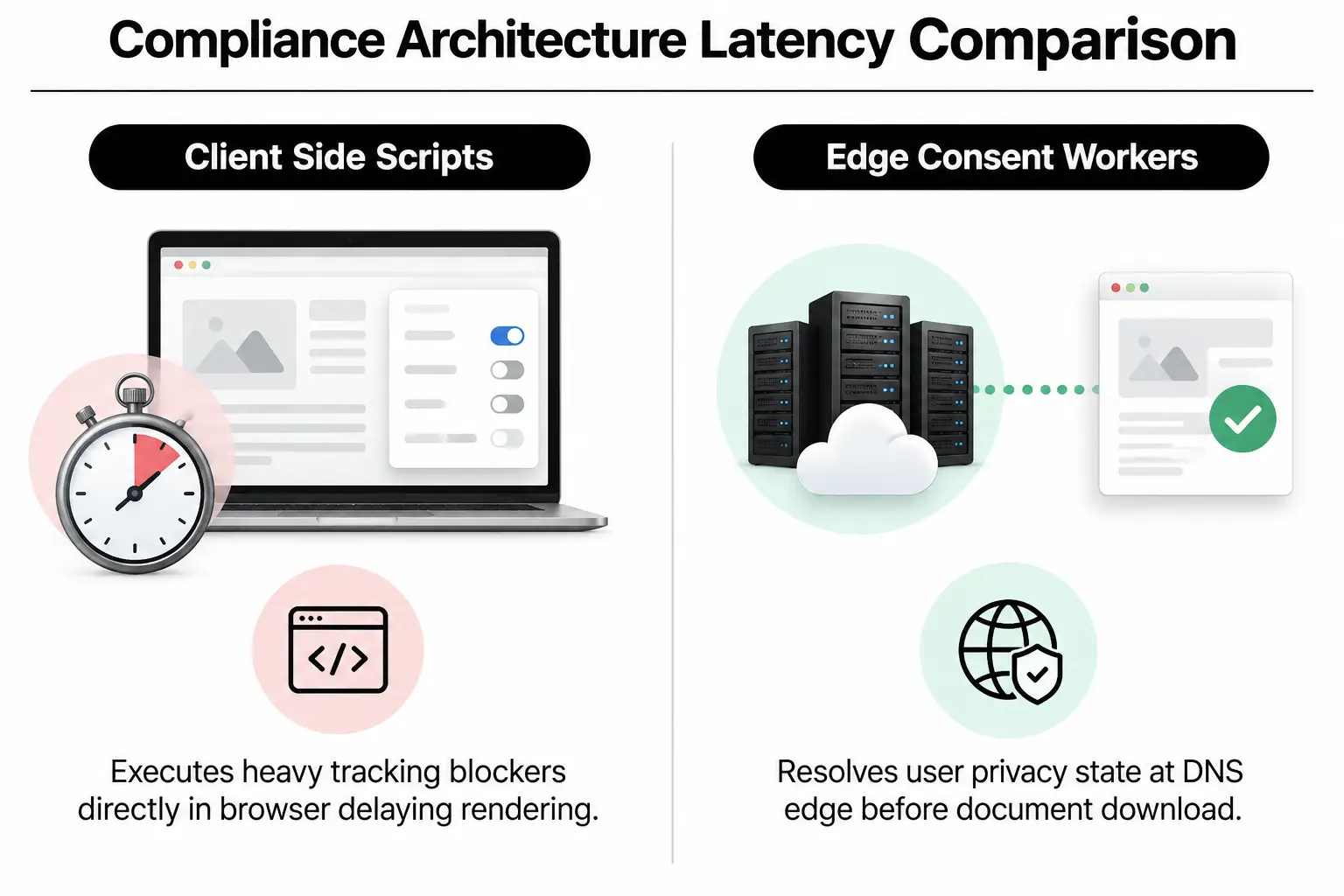
Consent tools often check dozens of conditions before allowing other scripts to run. Their added code can clash with core stylesheets or disrupt store software and caching. Finding the exact conflict lets developers bring response times back down without breaking the rules for honoring opt-outs.
| Compliance bottleneck | What to check | Severity |
|---|---|---|
| Tags that block other work | The network timing chart shows several seconds spent waiting for consent scripts from a remote delivery network. | High |
| Too much cookie data | Request headers, the details browsers send with page requests, exceed recommended data limits on repeat visits. | Medium |
| Duplicate consent listeners | Several plugins respond to the same visitor action, forcing the browser to repeat calculations. | High |
| Notices that bypass caching | Every page view skips cached copies on nearby servers so the main server can check the visitor’s location. | Critical |
Server-side location checks often break full-page caching. Checking every request for an IP address in San Diego or outside California sharply raises Time to First Byte, the initial server response time. Developers avoid this with code running on nearby network servers and mobile app development patterns that process consent status without holding up other work.
Safe Adjustments to Recover Lost Milliseconds
You can make several changes in site settings without rewriting the underlying code. These checks cut unnecessary server work while helping prevent accidental compliance breaches during speed improvements.
Video: Preloading inner pages with Flying Pages to speed up WordPress, 2021 (EducateWP)
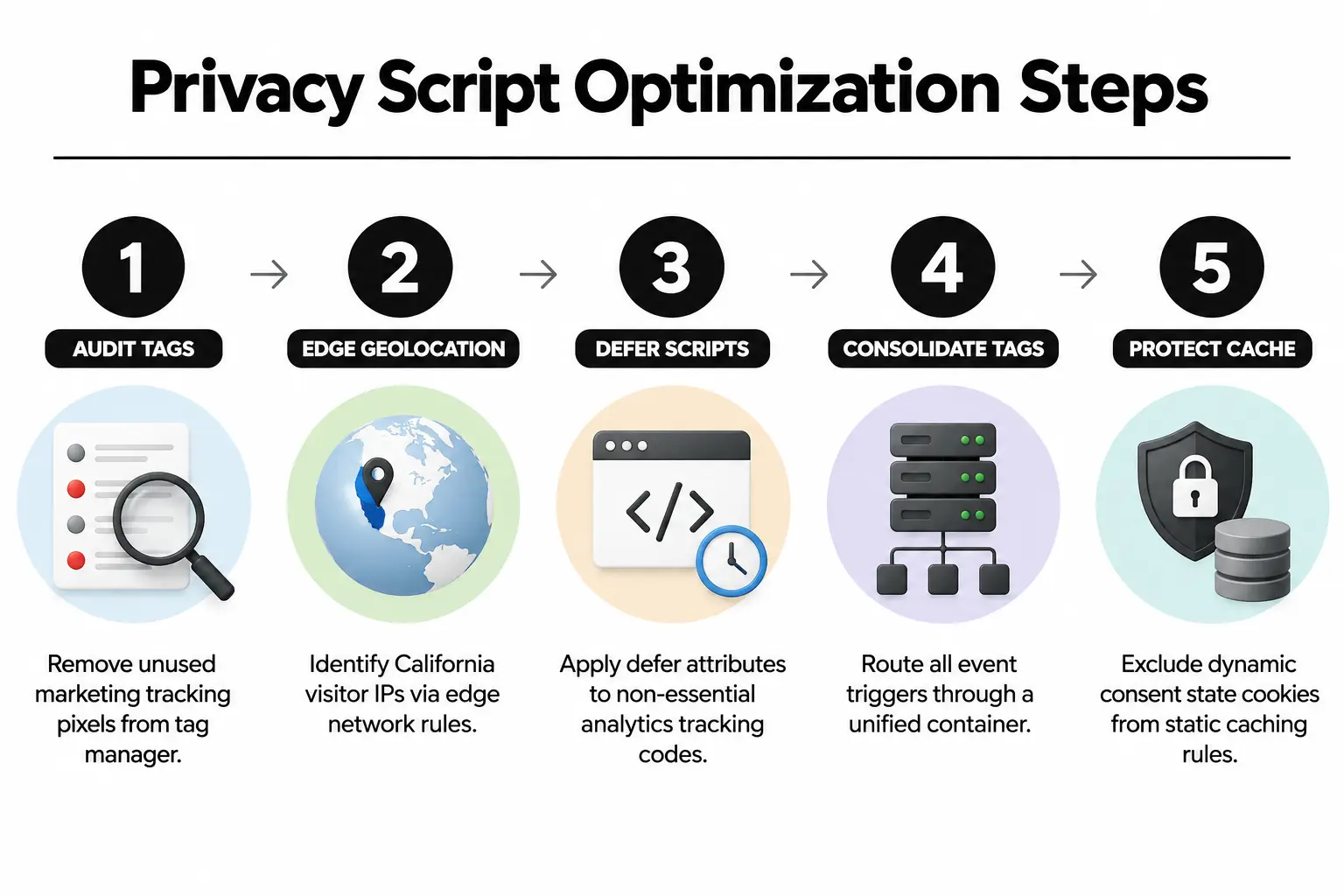
- Check registered tags: Remove tracking pixels and measurement tags left over from advertising campaigns that are no longer active.
- Move location checks to the network: Use tools such as Cloudflare Workers, which run code on network servers, instead of querying WordPress database filters.
- Defer unconditional analytics: Use the defer attribute to delay privacy scripts without blocking page parsing, while keeping strict opt-out handling in place.
- Use one script manager: Run all tracking tags through a single container rather than letting separate vendor plugins fire them independently.
- Review cache exclusions: Check that cookie banners do not cancel browser caching instructions on your main marketing landing pages.
Engineering rule: Never store one visitor’s consent status in a cached HTML page shared with everyone.
Good privacy data handling needs careful page speed optimization that protects Core Web Vitals and honors legally required opt-outs. Continued lag after these changes means the site’s underlying setup needs more substantial work.
When Custom Data Architecture Demands Senior Engineers
Settings alone can only do so much on enterprise platforms handling millions of transactions each month. Complex Magento development work or connections to customer management software require manual code changes. Custom API endpoints, the interfaces that receive software requests, must process opt-outs without blocking transaction databases.
Senior developers rebuild how consent data moves through the site. That can mean separating data from the front end and setting up webhooks, which send updates between systems. They also improve interface design; experienced web development teams put third-party trackers in isolated processing environments so they have no effect on the page’s first visible content.
For custom stores built through Shopify development or WordPress development, rewriting existing code brings tracking tags under one set of controls. That protects visitor privacy and prevents the speed penalties that so often cause shoppers to leave.
Routine Steps to Maintain Speed and Legal Hygiene
Marketing teams often add scripts without checking with the people responsible for the site’s architecture. Those additions gradually bring delays back into key tasks, so performance and compliance need regular technical checks.
- Quarterly script audits: Review every active third-party tag every three months to confirm you still need it and check how fast it runs.
- Automatic speed monitoring: Set alerts when a script pushes Largest Contentful Paint, the time the largest visible element takes to appear, past 2.5 seconds.
- Consent flow checks: Test opt-out links monthly to confirm the systems receiving CCPA requests update consumer profiles immediately.
- Tests before release: Measure speed on a test server before moving consent management software updates to the live site.
Regular audits and scheduled e-commerce development reviews help your systems withstand unexpected slowdowns. Keeping the code properly managed ensures that compliance does not get in the way of business growth.
Technical Questions on Privacy Script Optimization
Can CCPA banners be deferred without causing compliance violations?
Yes, banners can load without blocking other work, provided tracking pixels stay paused until visitor preferences are recorded. The law requires honoring opt-outs before selling or sharing personal data; it does not require freezing the page’s display. Scripts kept in a waiting state meet both the legal requirements and speed guidelines.
Why does my WordPress cache fail after installing a consent plugin?
Most consent plugins set changing cookies that mistakenly make caching tools treat everyone as a logged-in visitor. Your server then rebuilds each requested page instead of sending a saved copy. Configuring the server to ignore consent status cookies on public pages restores full caching performance across the delivery network.
Does Google tag manager hurt page speed during compliance checks?
Google Tag Manager slows a site if dozens of tags run in a blocking sequence before visitors can interact. Advanced consent mode settings let tags wait for permission signals without interrupting the browser as it reads page code. Third-party measurement libraries then avoid tying up the main thread.
How can mobile users browse smoothly with CCPA opt-out-links present?
Clear opt-out links in a persistent footer menu avoid the need for overlays that interrupt browsing. Plain HTML links take almost no rendering work compared with complex floating consent widgets. Mobile menus stay responsive, and visitors can still see and use the privacy choices required by law.
How does custom App development eliminate consent lag?
Custom app development routes tracking through lightweight software interfaces and network workers instead of stacks of browser scripts. Moving consent logic to those cloud workers removes bulky libraries from the visitor’s browser entirely. With that work off the page, it keeps loading times within fractions of a second.
Audit and Accelerate Your Compliance Stack in California
At Prozco Branding, we work from Rancho Palos Verdes with brands across California. Meeting privacy rules without slowing a site takes experienced systems engineers. Our team removes unnecessary tracking code and changes script queues, with enterprise system improvements that keep your sites fast and fully compliant.
We handle focused code repairs as well as complete system redesigns, with results you can measure. Our resource page on custom WordPress sites has more technical guidance. To address the delays in your own setup, contact Prozco Branding to schedule a technical consultation.