


















































































Technical SEO checks whether search engines can reach your pages, read them, and add them to their index. For businesses investing in web and e-commerce development, an audit finds problems in code and server responses before they hurt search visibility. Most owners read the score as a marketing grade, but a passing number cannot guarantee sales when core templates are broken.
The audit looks beneath the design at how your site works. It checks server speed and whether URLs open without redirect loops. It also checks that search bots can follow links to deep catalog pages. For businesses across Los Angeles, CA, separating these checks from visual design helps build sites that search engines can catalog accurately.
What’s Inside This Guide
- Core Infrastructure Metrics and Crawl Mechanics
- Quantifying Indexation Efficiency and Crawl Waste
- Standard Benchmarks for Modern Catalogues
- Diagnostic Tooling for Architecture Monitoring
- Engineering Priorities That Move Technical Scores
- Review Cadence and Practical Decision Frameworks
- Common Technical Audit Questions
- Planning Your Infrastructure Review
Core Infrastructure Metrics and Crawl Mechanics
An infrastructure audit checks how easily search engines can access a site. It measures indexing rates, server delays, and the resources needed to display pages. It checks time to first byte, the wait for a server’s first response, and wasted visits to duplicate filter URLs or broken scripts. Mobile checks matter because Google uses mobile-first indexing across the web.
Video: How to Audit Your Sitemap for SEO | Fix Indexing & Crawl Budget Issues (Pearl Lemon SEO )
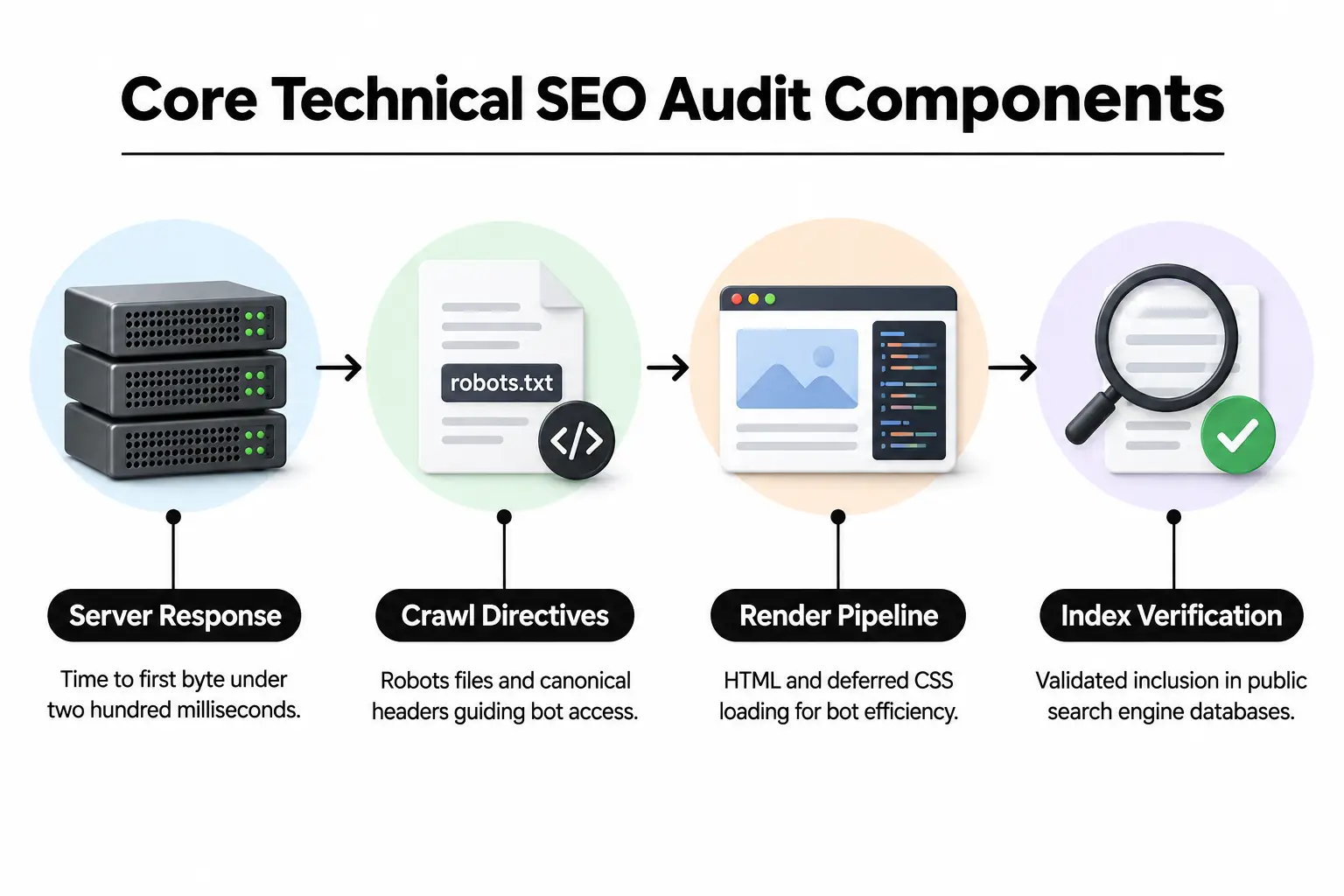
The audit does not judge your copy or brand positioning, including the messages meant to drive sales. A site can earn a clean technical score and still have weak copy or a confusing checkout. In professional content management systems, technical SEO keeps server health separate from how products are presented.
Engineers check how page templates load on desktop and mobile screens. For businesses with complex catalogs, that means reviewing dedicated hosting setups or checking physical servers. By evaluating hosting infrastructure, teams can confirm that the hardware delivers files fast enough for search bots to finish their crawl.
Quantifying Indexation Efficiency and Crawl Waste
Indexation efficiency is the main calculation in a technical review. Divide the number of valid indexed URLs by the total URLs search crawlers have found, then multiply by one hundred. The percentage tells you how much of your discoverable site has made it into Google’s database.
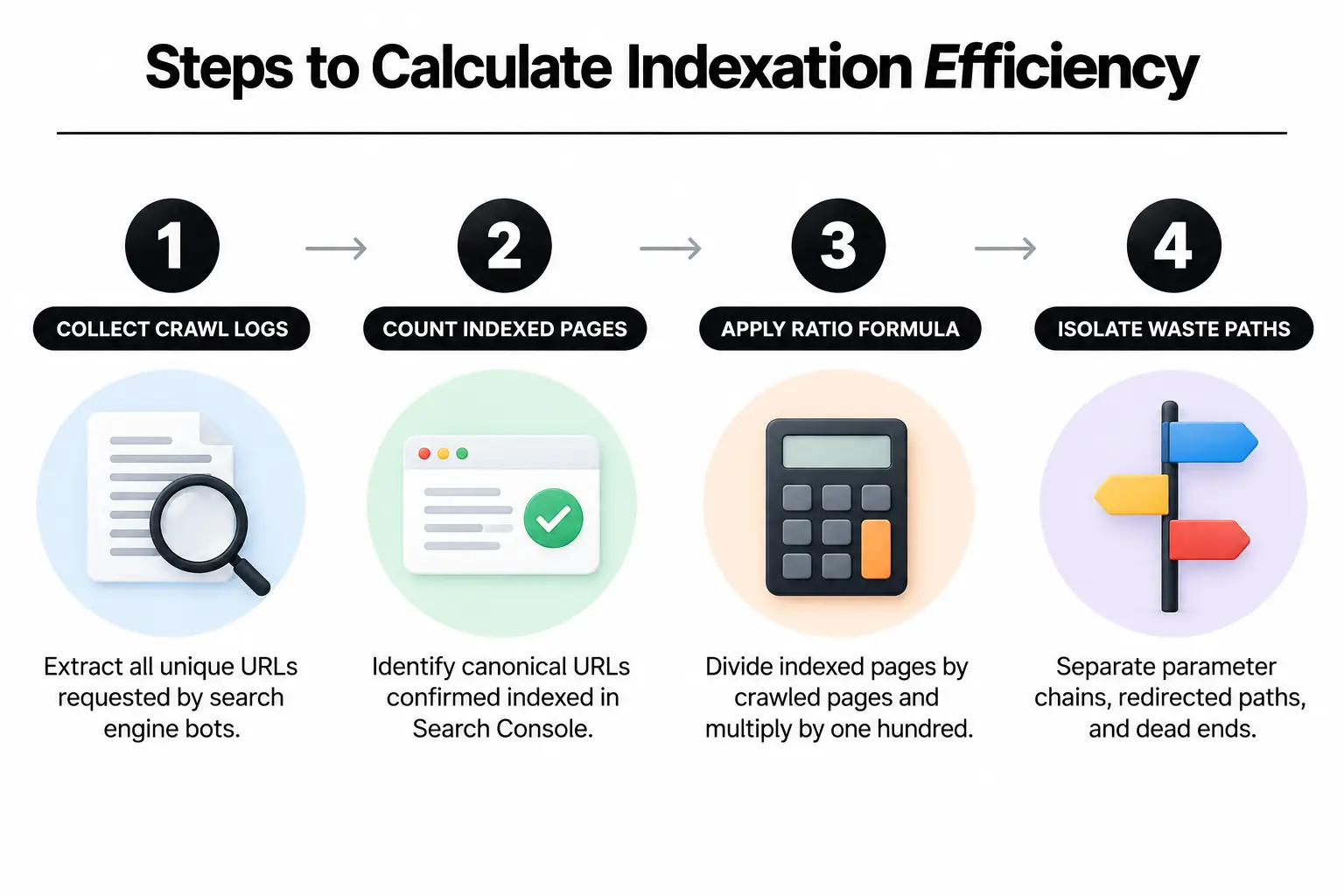
Take a hypothetical custom apparel store in Los Angeles. A crawler finds 10,000 URLs created by color and size filters, plus sorting options. Google indexes just 2,500 canonical product pages, the preferred versions of those URLs. Indexation efficiency is 25 percent: three out of four crawled URLs use crawl resources without adding organic search value.
Engineers also calculate crawl waste: requests without a 200 success response divided by total crawler requests. These include 301 redirects, 404 missing-page errors, and 500 server errors. If 40,000 of 100,000 monthly bot requests hit redirect chains or dead paths, crawl waste is 40 percent. That wasted server capacity slows the discovery of new products.
Standard Benchmarks for Modern Catalogues
The right audit targets depend on catalog size, the content management system, and how often you publish. A small corporate site with forty pages should aim for indexation efficiency above 95 percent. On a clean site, every public URL should have a clear business purpose and be ready for indexing.
Large stores with hundreds of category branches have different constraints. Faceted navigation, which lets shoppers filter products, creates millions of URL combinations. For these stores, crawl waste below 10 percent and indexation efficiency above 80 percent indicate stable performance. Correct settings keep search bots from getting stuck in endless filter combinations.
Server speed targets stay strict at every size. Initial document requests should receive a response in under 200 milliseconds according to W3C standards. Beyond 600 milliseconds, bots reduce crawl frequency. If your server is struggling, ask our engineering team to assess the infrastructure directly.
Diagnostic Tooling for Architecture Monitoring
To track technical health, combine server logs with live crawling tools. Browser tests alone miss the requests search bots actually send to your origin server, the server that hosts your site’s files.
- Google Search Console: Check the Page Indexing report for excluded URLs. Inspect canonical declarations to see which page versions Google has indexed.
- Server access logs: Review raw HTTP request records to identify Googlebot traffic. Track visits across product directories and watch response status codes in real time.
- Headless crawlers: Run automated desktop crawlers weekly to follow the paths search bots take. Check for broken links and circular redirects, along with missing canonical tags.
- Lighthouse and web.dev: Check Core Web Vitals on typical templates. Largest Contentful Paint measures main-content loading time, while Cumulative Layout Shift tracks unexpected movement on the page.
Engineering Priorities That Move Technical Scores
Sort audit fixes by how much of the site they affect. A metadata edit changes one page, while a change to template loading logic can fix thousands of storefront URLs at once. Good web and e-commerce development puts those shared structural fixes first, so the work carries across the database rather than stopping at individual pages.
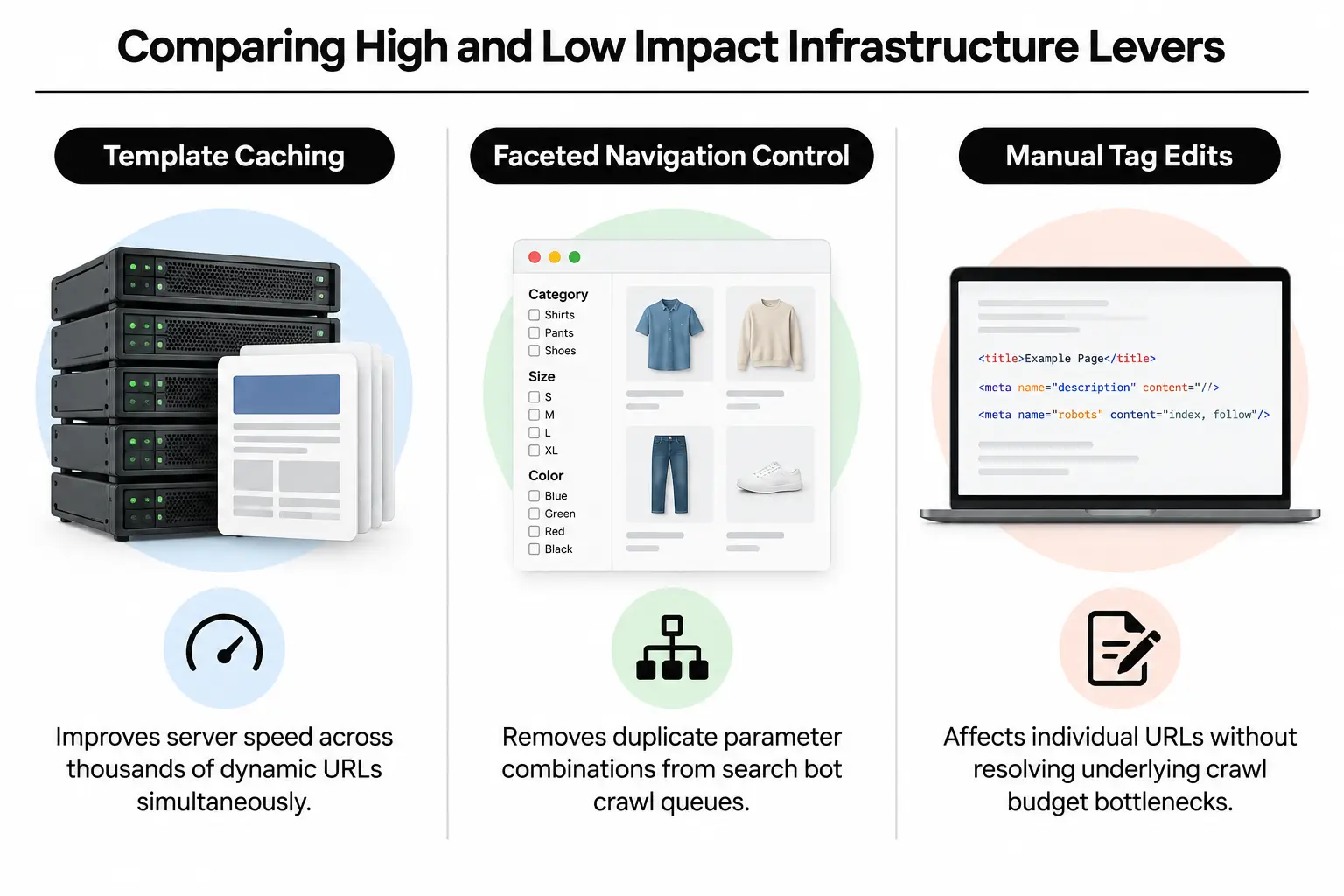
| Technical change | What it changes | Engineering effort |
|---|---|---|
| Faceted navigation controls | Removes duplicate filter URLs from crawler queues | Moderate (canonical & robots rules) |
| Server cache tuning | Reduces time to first byte and delivers templates faster | High (Redis / Varnish setup) |
| Structured data checks | Adds machine-readable schema markup following Schema.org specifications | Low to moderate (JSON-LD templates) |
| Internal link changes | Passes page authority directly to high-margin catalog items | Moderate (navigation & breadcrumbs) |
| Script removal & delayed loading | Helps browsers display pages faster by removing files that block rendering | High (build tool rebuild) |
Complex sites need clean templates that fit the framework underneath them. That may mean building custom WordPress websites for extensive editorial content or choosing a specialized structure for merchandise. Our articles on e-commerce development explain more about building commerce foundations that can handle growth.
Review Cadence and Practical Decision Frameworks
Read technical metrics alongside business results. A drop in indexation efficiency often explains falling organic impressions weeks before revenue changes show up in analytics. Review automated crawl reports weekly. Look for accidental noindex tags that block indexing, exposed staging pages, and server errors introduced by deployments.
Monthly reports should compare crawl data with organic landing page visits and server response charts. If response times exceed 500 milliseconds after an upgrade, investigate backend performance before changing the design. As you add content, pair technical monitoring with a clear publishing structure, such as corporate blog design, to keep authority flowing through internal links.
Reality check: Fixing fifty broken links rarely changes organic revenue. Removing five thousand parameter URLs that trap crawlers restores indexing speed for your highest-margin inventory.
If your brand needs custom design and extensive features, check how page components compile into the files browsers load. Our notes on custom UI and UX design explore specialized approaches to this work. Frontend assets can support a visually rich site without slowing down server execution.
Common Technical Audit Questions
What makes magento 2 web design technically distinct for search audits?
Specialized Magento 2 design work needs careful server caching and database indexing. Dynamic catalog queries can overload PHP workers, the processes that execute server-side code. Proper Varnish caching lets crawlers receive catalog pages in milliseconds instead of waiting for complex database queries to finish each time.
How does web development quality affect crawling performance?
Good development sends clean HTML to the browser without depending entirely on browser-run JavaScript for basic links and product schema. When the server includes core content in that HTML, search bots can read and index catalog pages on their first visit. They do not need to queue those pages for a second rendering pass.
What should developers check during magento 2 design implementation?
During a Magento 2 build, developers should check the layout XML files that define page structure. Those files should not load unused JavaScript libraries and CSS style files on every product template. Loading visual elements only on the layouts that need them keeps rendering light and prevents unexpected page movement on mobile devices.
How do engineers approach web design for shopify websites to protect technical scores?
For Shopify sites, engineers need to keep Liquid template files manageable. They must also stop third-party app scripts from adding conflicting tracking tags to the theme header. Lean theme code prevents an oversized document object model, the browser’s page structure, and keeps Largest Contentful Paint times fast on mobile networks.
What issues commonly appear during website design magento reviews?
Magento design audits often find duplicate product URLs because product links include category paths. Fixing this requires site-wide canonical tags that identify each product’s preferred URL. Developers also need to set catalog options so products are served only from top-level root URLs, without those extra category paths.
When should you hire a specialized magento 2 web designer?
Hire a Magento 2 specialist when custom interface components must work with caching layers and Elasticsearch search software. That also applies to Hyvä or PWA frontends, which control the shopper-facing experience. Generalist developers often add visual elements that accidentally bypass page caching, forcing the server to respond more slowly.
What technical elements matter most in magento 2 homepage design?
For a Magento 2 homepage, use responsive WebP hero images and preload the main Largest Contentful Paint asset. This helps avoid visual performance penalties. Developers should also replace automated sliders with static hero sections to prevent large layout shifts and keep total page execution under two seconds.
Planning Your Infrastructure Review
Structural audit problems need coordinated engineering work, not surface patches. At Prozco Branding, we treat web infrastructure as the foundation of every digital marketing campaign. We review server logs and database bottlenecks, then check theme architecture so search bots can read your platforms properly.
We work directly with businesses in Los Angeles, CA to build stable e-commerce systems that can grow. Our work covers slow catalogs and responsive layouts across custom templates, as well as complex commerce platforms. We provide clear engineering reports so you can see what needs attention.
Technical fixes usually take four to twelve weeks to show up in crawl behavior. To have us assess your site’s foundation, contact Prozco Branding and schedule a detailed code and architecture review.