


















































































Skipping a check of your backend connections is the fastest way to burn capital on a mobile app. For most California retailers and service businesses, a hybrid app built around APIs, the connections between systems, supports existing Magento development without draining operating funds. Heavy dependence on device hardware changes that choice.
Direct Bluetooth pairing or continuous background location tracking calls for a fully native app, even with the higher upfront cost.
Many California companies rush into app stores because competitors have launched there. Then recurring maintenance fees outpace order volumes. An app that sits apart from your main sales channels leaves customers with broken inventory updates and little reason to keep it installed.
Before spending on engineering, check how customers actually use your site and where they get stuck.
What’s Inside This Guide
Use this guide to work through the technical choices and integration problems that can derail an app:
- Why Mobile App Missteps Drain Business Capital
- Choosing Between Native Frameworks and Web Hybrid Stacks
- Aligning Your Mobile Roadmap With Operational Realities
- Connecting Storefront Backends and Application APIs
- A Direct Five-Step Framework for Reliable Deployment
- Allocating Development Budgets for Sustainable Growth
- Straight Answers on Common App and Platform Inquiries
- Next Steps for Validating Your Mobile Architecture
Why Mobile App Missteps Drain Business Capital
Too many mid-sized businesses treat an app as a bigger digital business card. Without live inventory and checkout connections, one failed purchase can be enough for a customer to delete it. California shoppers expect apps to work and have little patience for unstable software before switching back to mobile Safari or Chrome.

Rushed launches often leave systems sharing outdated or mismatched data. That means promising stock you cannot supply or charging the wrong sales tax across local districts. Early work with an experienced branding agency helps establish whether customers need an app at all, or just a faster mobile website.
Architecture rule: Before writing app code, document your central database structure and inventory webhooks, the messages that report stock changes, and test them under load.
Failed technical foundations push user retention below ten percent in the first thirty days. Repairing trust after broken checkouts costs far more than planning the app’s API connection points from the start.
Choosing Between Native Frameworks and Web Hybrid Stacks
Your first choice is between separate native builds, using Swift for iOS and Kotlin for Android, and shared frameworks such as React Native or Flutter. Check who on your team can maintain each option over time. Otherwise, you risk paying for code that nobody can update.
Video: Common mobile app development mistakes and how to avoid them (Alliance Omnichannel)
Choosing a Magento Developer in California for Native App Integration
An experienced Magento developer in California makes sure your app connects properly to existing inventory and customer records. Their review should cover your API connection points. Headless GraphQL APIs, which let a separate app request specific store data, can supply your product catalog without creating a duplicate database.
| Development option | Recommended starting point | What to watch |
|---|---|---|
| Fully native (Swift & Kotlin) | Frequent hardware access, intensive background GPS, or custom audio processing | Twice the maintenance budget, with separate engineering teams needed for each update ($$$) |
| Cross-platform (React Native / Flutter) | Standard product catalogs, user accounts, service bookings, and digital loyalty cards | Third-party libraries may become unstable during major annual iOS and Android updates ($$) |
| Progressive web app (PWA) | Content-heavy publishers and retailers testing demand for a mobile home-screen icon | Limited offline background updates and uneven push notification support on older devices ($) |
Cross-platform frameworks make sense for roughly eighty percent of commercial ventures in the region. Developers work from one shared codebase rather than maintaining separate versions. For everyday shopping tasks, customers cannot distinguish the performance from a native app.
Aligning Your Mobile Roadmap With Operational Realities
A store does not automatically need an app store listing. Before committing a large budget, check whether fixing mobile browser checkout would solve your conversion problems sooner than building an app.
| Business situation | Recommended choice | Architecture to avoid |
|---|---|---|
| Frequent repeat orders, such as weekly groceries, daily coffee, or recurring wholesale purchases | Hybrid app with fingerprint or face recognition login and stored payment wallets | Static web pages wrapped in an app that makes customers log in manually |
| Infrequent purchases, such as seasonal equipment or expensive custom home goods | Faster mobile web checkout with SMS shipment alerts | Requiring a multi-megabyte download for one purchase a year |
| Field technicians and warehouse staff working with poor cell coverage | Offline-first storage using a local SQLite database, with automatic background updates | Cloud-dependent apps that stop working when the cell signal drops |
Practical check: If your average customer orders fewer than four times a year, spend on web performance before asking them to install an app.
Look closely at the time between orders. Retailers with few repeat purchases get immediate returns from dedicated Shopify development or better mobile browsing, without waiting for app store approval. To check which approach fits your technical resources, talk to our technical team about reviewing the steps customers take to buy.
Connecting Storefront Backends and Application APIs
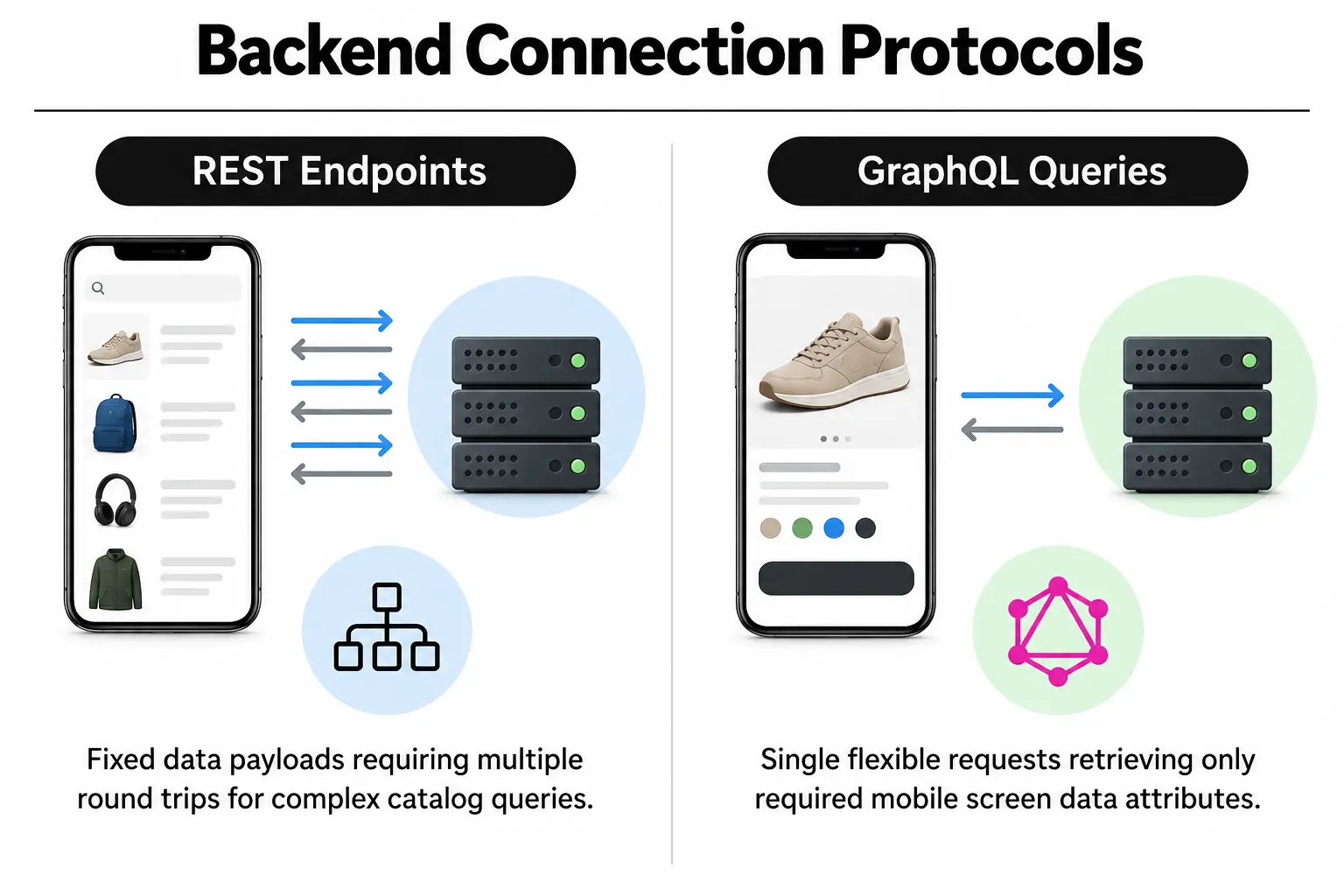
Reliable backend connections keep an app working. Unless mobile checkout updates stock immediately across your warehouse and Los Angeles retail stores, you will end up selling items that are already gone.
| Starting point | Connection approach | What to test | Intended result |
|---|---|---|---|
| Enterprise product catalog | REST or GraphQL APIs that serve data separately from the storefront | Simulated peak-hour traffic with many simultaneous requests | Fast catalog loading during promotions |
| Mobile payment processing | Apple Pay and Google Wallet APIs using tokens instead of card details | Declined cards and expired payment authorization | One-touch checkout without extra steps |
| User profile management | Encrypted OAuth tokens that verify account access | Accounts staying signed in after device upgrades | Matching customer carts on laptop and phone |
| Application security layer | Strict limits on requests through the API gateway | Simulated attacks using stolen login credentials | Protection against bots scraping inventory data from backend servers |
Fast responses over mobile networks also depend on well-tuned servers. Ongoing page speed optimization alongside API work keeps database requests efficient during busy periods. Our guide to five enterprise Magento security patches explains how unpatched backend flaws expose both your website and connected apps to intrusion.
A Direct Five-Step Framework for Reliable Deployment
Work through these engineering checks before launch. Skipping them can turn avoidable release problems into negative reviews on your public app store listing:
- Audit database connections: Check that every remote API request returns a properly structured response within two hundred milliseconds under moderate load.
- Check regulatory compliance: Confirm that data retention rules and consent banners meet state consumer privacy requirements before collecting analytics.
- Test failures in a safe environment: During checkout, simulate lost connections and payment gateway timeouts. Include sudden shutdowns caused by battery-saving mode.
- Submit for early store review: Give working test-account credentials to the app review team at Apple and Google Play Console reviewers at least three weeks before marketing launches.
- Schedule code maintenance: Run monthly checks of existing features so major operating system updates do not break essential checkout steps.
Staged rollout check: Release major versions to five percent of users for forty-eight hours before statewide distribution to catch unexpected memory leaks, where software fails to free unused memory.
Stable performance takes ongoing checks. Coordinate app releases with routine website maintenance so web servers and mobile API connections stay aligned through every catalog change.
Allocating Development Budgets for Sustainable Growth
Businesses often underestimate what an app costs after launch. The initial build accounts for roughly forty percent of its two-year expense. Infrastructure and bug fixes, along with updates for operating system changes, make up the remaining sixty percent.
| Budget level | What to prioritise | What to question |
|---|---|---|
| Lean ($) | Reliable checkout and fingerprint or face login, with lightweight push notifications | Custom animations and proprietary chat systems, plus unnecessary interface libraries |
| Mid-tier ($$) | Automatic error logs and shared cross-platform code, with close warehouse integration | Custom payment gateways that duplicate established processors |
| Enterprise ($$$) | Automated feature tests, separate task-specific services, and content caching across regions | One large backend system that ties the mobile interface to a single legacy vendor |
Clear documentation and automated tests save substantial engineering time later. Simple integrations protect the budget for custom WordPress websites as well as multi-tier retail platforms. Our Lami TV project shows the architectural choices behind digital tools that handle ongoing user traffic without backend failure.
Straight Answers on Common App and Platform Inquiries
Why hire a Magento development agency in California for an e-commerce app?
Working with a Magento development agency in California keeps your app connected to local tax and shipping rules while meeting state privacy requirements. Local teams understand the regional market. Shared Pacific working hours also make it easier to resolve mismatches between inventory databases and the mobile app.
When should a company bring in a specialized e commerce agency?
Bring in an e-commerce agency when your app needs to connect with enterprise resource planning software, which manages core business operations. Multiple warehouses and automated fulfillment centers also call for specialist help. These agencies supply developers and security testers, alongside user-experience specialists who understand how mobile checkout affects store revenue.
How does Magento 2 design differ from mobile UI UX design?
Magento 2 design focuses on layouts that resize in browsers and respond to desktop clicks. Mobile interface design puts gestures first, with bottom navigation and checkout buttons within thumb reach. Copying a browser layout straight into an iOS or Android app confuses customers and increases abandonment.
Can an existing Magento 2 web design layout be converted into a mobile app?
Templates from a Magento 2 website cannot be imported directly into mobile frameworks. Brand fonts and shared style settings can carry over, along with digital marketing assets. Reusing the same API connections lets a native app display your catalog through an interface built for touchscreens.
Does website design for Magento need to match the native application?
Consistent visuals across your Magento website and app help customers trust that they are dealing with the same business. Navigation still needs to suit the device. Phone screens need focused tasks in a single column, while desktop sites have room for wide comparison tables and larger menus.
Can a remote team handling Magento development in Wisconsin support California mobile infrastructure?
Developers handling Magento projects in Wisconsin or elsewhere can support California app backends. They need strict coding standards and a sound understanding of West Coast commercial regulations. For remote server connections, technical skill and reliable communication matter more than having an office nearby.
How does Magento 2 homepage design translate to an app home screen?
Adapting a Magento 2 homepage for an app means replacing large promotional graphics and layered menus with compact category carousels and personalized feeds. Mobile users need to finish a specific task within seconds, rather than browse broad department directories.
Next Steps for Validating Your Mobile Architecture
Before hiring software contractors or setting a development budget, check that your app plan fits your existing web systems. Use this list to confirm the technical work and ongoing responsibilities:
- API stability: Have you mapped every database connection and set up monitoring, then tested it under mobile traffic loads?
- Clear business utility: Does the app offer customers something useful beyond what your mobile website already provides?
- Framework validation: Does your native or hybrid choice reflect technical needs rather than the agency’s preferred tools?
- Compliance check: Have you set data retention rules and California Consumer Privacy Act opt-outs across all storage on users’ devices?
- Maintenance commitment: Does the budget cover regular operating system updates and security patches?
At Prozco Branding, we build mobile apps that work with your e-commerce systems and web storefronts. Our recent client work shows how we structure digital products across industries. For a review of your mobile plan or backend connections, contact our team to set out the engineering work your app needs.