















































































Custom apps can help Los Angeles boutiques grow when standard software cannot keep store and online inventory in sync. For apparel and lifestyle brands, Shopify web design paired with private apps automates work that public plug-ins cannot handle.
Targeted apps let local merchants route orders automatically and connect regional warehouses. They also help protect site speed during busy product drops.
Adding dozens of third-party tools after a store outgrows its standard features slows checkout and introduces security risks. Private apps built around your store’s rules replace those overlapping subscriptions. Your operations team keeps control of customer data and decides how orders move through fulfillment.
What’s Inside This Guide
- Anatomy of Private Storefront Infrastructure
- From Concept to Deployment: The Development Lifecycle
- Custom Architecture Compared with Public Plugins and Headless Builds
- Practical Development Paths for Independent Retailers
- Evaluating Operational Fit for Growing Stores
- Ongoing Upkeep and API Maintenance Schedules
- Common Technical Questions from Store Owners
- Plan Your Storefront Architecture
Anatomy of Private Storefront Infrastructure
A custom app connects your online catalog to payment processors and store registers. Private software talks directly to the platform’s app interface, or API, through secure connections kept separate from other merchants. At Prozco Branding, our engineers build these connections around the everyday problems local stores need to solve.
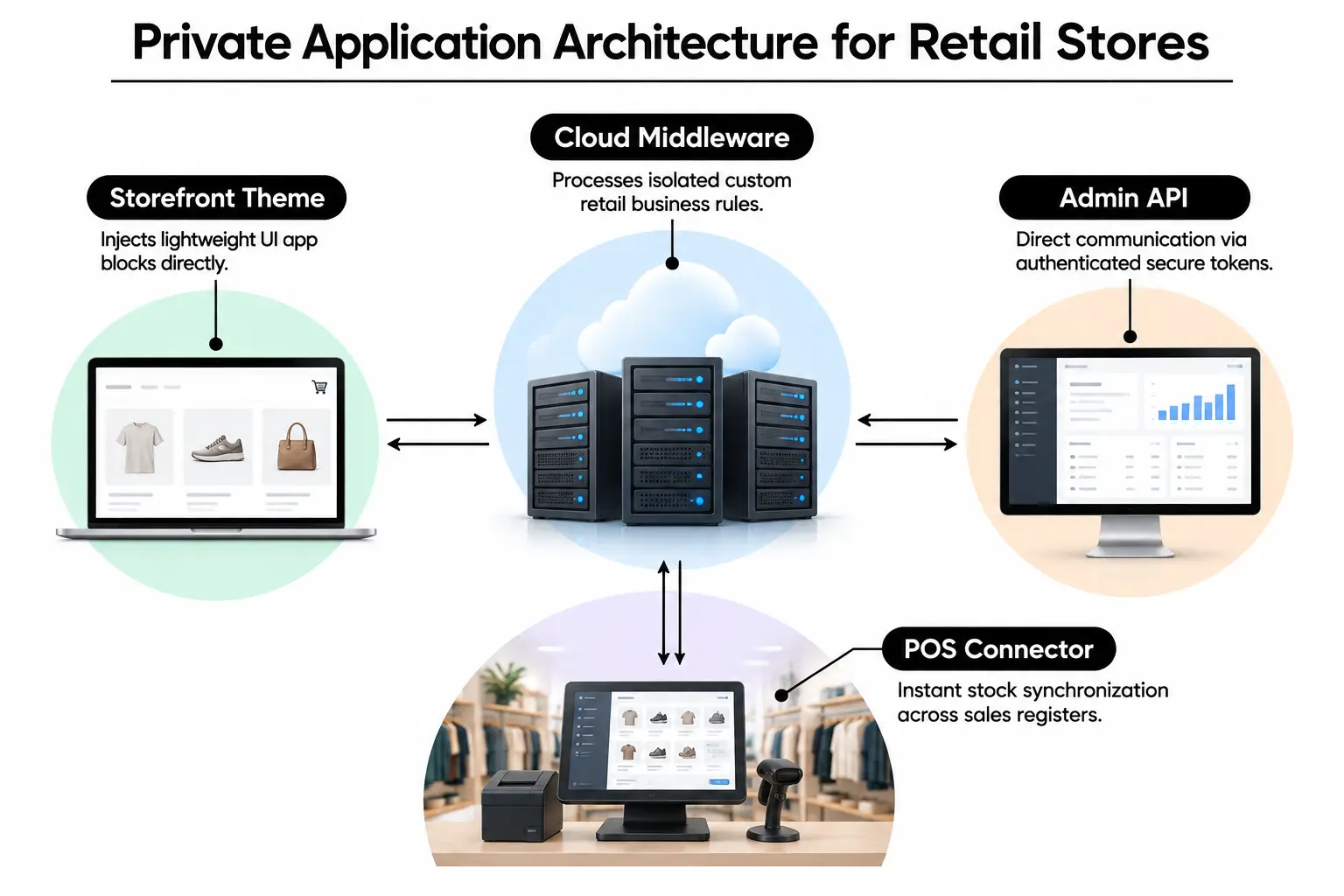
- Middleware server: This cloud server runs the software between your systems. It holds business rules and converts data without changing the files that run your storefront.
- Custom webhooks: These automatic alerts tell outside fulfillment centers as soon as payment clears for an order placed online or in your store.
- Front-end app blocks: These customer-facing tools sit inside your theme without cluttering shared Liquid template code or slowing page loads.
- ERP and POS connectors: These links join business management software and point-of-sale registers. They keep stock counts at Los Angeles stores aligned with your ecommerce database.
Keeping app functions separate from theme code protects your store from code conflicts when you change its look for a new season.
From Concept to Deployment: The Development Lifecycle
Our first step is to review how store staff pack goods, record backorders and handle local returns. Developers map each system’s data fields so product variants and stock codes match across platforms, along with customer loyalty tiers. Testing then moves to a staging environment, a separate copy where webhook checks cannot affect live shoppers.
Video: Building custom Shopify apps and plug-ins in 2026, with an update coming (Shopify Surfers)
After the app handles partial orders and split deliveries, we test checkout under simulated peak traffic. Following staging reviews, developers move it to live cloud servers with automated deployment checks that monitor uptime and access-token renewals. Thoughtful web design makes the resulting dashboard tools easier for back-office staff to use.
The Overlooked Reality of Webhook Concurrency and Rate Limits
Most boutique owners overlook API rate limits, which cap how often software can request data during a busy sale. Shopify limits standard REST requests per second, so an order rush can slow messages between checkout and your warehouse. Our Shopify development work addresses this with GraphQL bulk mutations, which update records together, and Redis workers that manage waiting tasks.
Those queues hold incoming order data and process stock updates in batches. This prevents missed updates that can leave a store selling items it no longer has.
Custom Architecture Compared with Public Plugins and Headless Builds
Store owners often compare private apps with subscriptions or headless builds, which separate the storefront from the commerce system. Marketplace tools are quick to test, but fifteen plug-ins together slow scripts and create code conflicts. Independent studies documented in web development resources link excess third-party scripts to poorer loading metrics and more mobile visitors leaving.
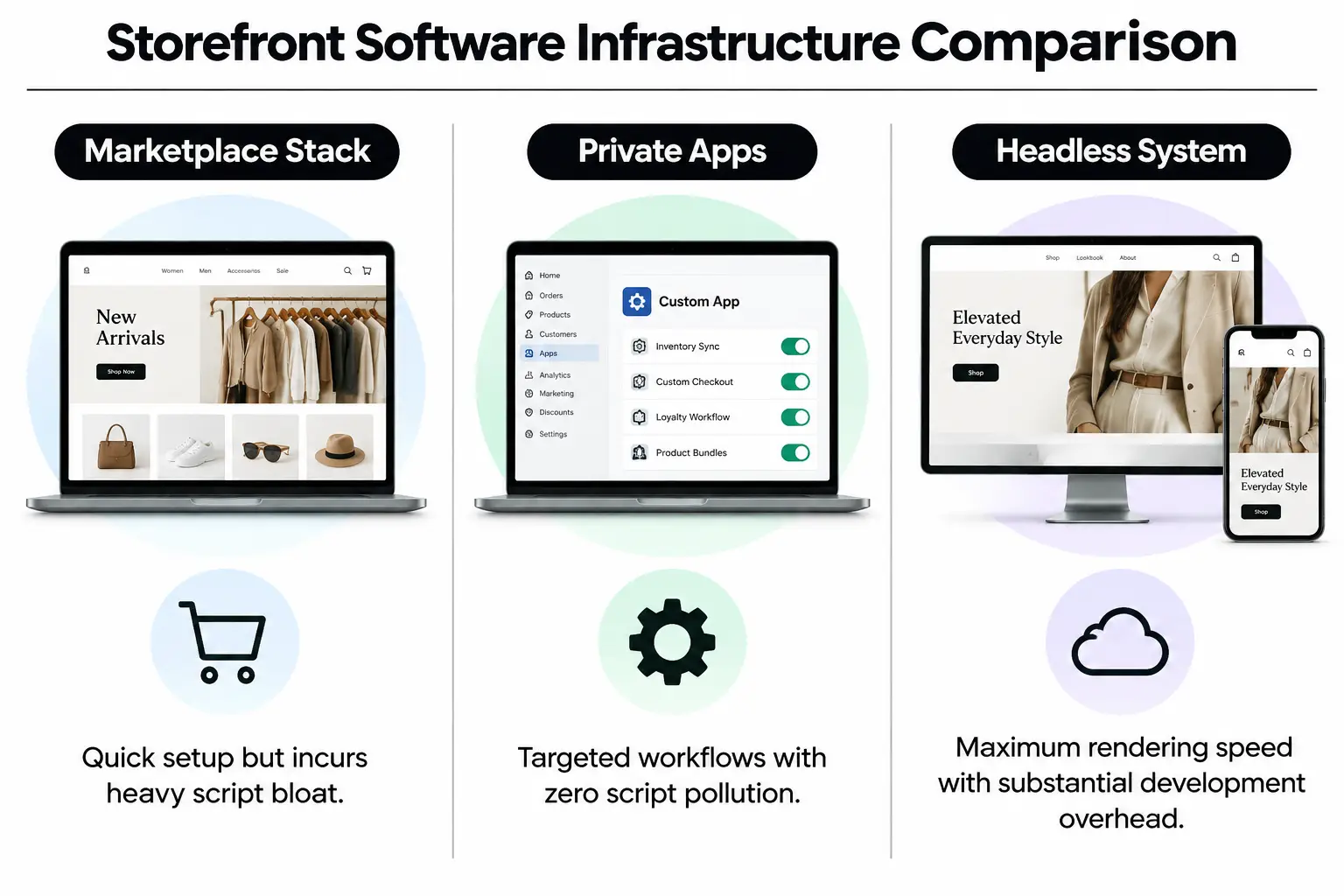
| Operating model | Effect on speed | Monthly costs | Control over business rules | Best fit |
|---|---|---|---|---|
| Marketplace app stack | Noticeable slowdown from third-party scripts | Fees depend on app count and subscription plans | Limited to the developer’s preset options | Startups testing product ideas |
| Private custom apps | No unwanted third-party scripts | Cloud hosting costs depend on usage; ask for a quote | Full ownership of workflows | Boutiques handling high order volumes |
| Headless setup | Fast delivery of prebuilt pages | Substantial server and development costs | Unrestricted display and routing options | Large groups with multiple brands |
Mid-sized retailers with steady monthly revenue can use custom apps to gain more control over daily work without taking on the costs of a larger rebuild.
Practical Development Paths for Independent Retailers
You can build a focused app for one part of the business rather than change everything at once. Start with the work that causes the most delays, then choose the development path that addresses it:
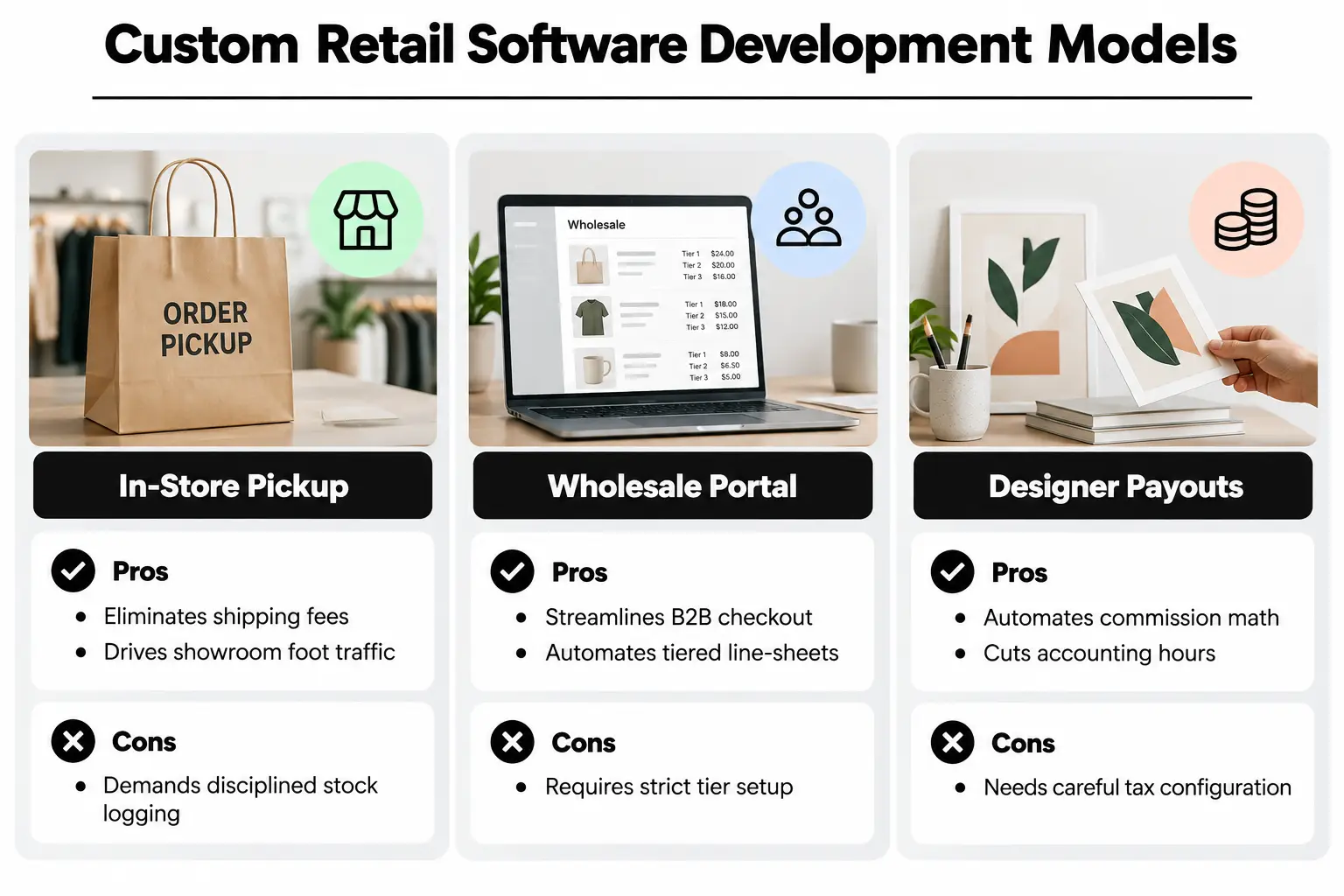
- In-store pickup and local routing: Customers reserve garments online and collect them at a local boutique. Advantage: Avoids courier fees and brings shoppers into the store. Drawback: Staff must record in-store sales right away to keep stock counts accurate.
- Tiered wholesale ordering portals: Wholesale buyers get their own product-list pricing and net-30 terms, meaning payment is due in 30 days. Advantage: Supports more corporate accounts within the same store database. Drawback: Complex volume-pricing tiers need dedicated database management.
- Consignment and designer payouts: Software calculates commissions for multi-brand boutiques carrying guest designers. Advantage: Cuts hours of monthly accounting work. Drawback: Tax rules and commission splits across tiers need careful planning before development starts.
Our cost comparison of custom builds and prebuilt themes can help you weigh the savings from a custom build against ongoing software subscriptions.
Evaluating Operational Fit for Growing Stores
Not every shop needs a custom app. New businesses with simple inventory at one location rarely need private servers. Stores with complex fulfillment rules or unusual product personalization get an immediate return from removing manual data entry.
| Store situation | Recommended approach | Main risk | Action to take |
|---|---|---|---|
| One retail shop with under 500 stock codes | Standard theme features and built-in tags | Building more than you need too early | Get manual stock checks right first |
| Multi-location boutique offering local pickup | Dedicated routing and stock-sync app | Staff leaving local stock counts out of date | Use barcode scans to verify stock |
| Flash sales that sell out quickly | Queued processing that runs tasks independently | Database tasks blocking each other at peak times | Use Redis queues to hold waiting tasks |
| Fashion brand selling across channels | Custom two-way connection to business management software | API data fields changing during upgrades | Check API versions quarterly |
Merchant’s rule: Never pay for custom software to fix a fulfillment problem that better packing procedures or staff training on stock categories would solve.
Ongoing Upkeep and API Maintenance Schedules
Private apps still need attention after launch. Cloud commerce platforms retire older connection points every few months as part of their security and performance updates. Your app needs to keep up with those changes.
Standard Maintenance Checklist for Stable Stores
- Quarterly API checks: Compare your app’s connection points with the latest releases so retired features do not cause unexpected webhook outages.
- Server error reviews: Read cloud server logs monthly to catch expired access tokens and data deliveries that failed even after another attempt.
- Database cleanup: Clear cached data tables so searches keep returning results in less than a second.
- Security credential changes: Regularly replace secret API access tokens and update the permissions given to internal dashboard users.
An agency handling regular website maintenance keeps your storefront fast and protected. That work also keeps it compliant with changing regional security requirements outlined in small business guidance.
Frequently Asked Questions About Storefront Development
magento 2 web design: how does it differ from a tailored Shopify setup?
A Magento 2 build gives you full server-level control over hosting and database rules, which suits complex business models. Shopify handles the cloud hosting while custom apps provide similar control over operations. You do not have to manage the physical servers running your database.
What should merchants consider regarding website design magento vs modern hosted platforms?
Choosing Magento means taking responsibility for dedicated database systems and regular security patches. Complex test and deployment processes need attention too. Hosted platforms remove that server maintenance burden, so your development budget can go toward customer-facing features that support sales and order routing built for your store.
How does web design for shopify websites impact checkout conversion rates?
Good Shopify design keeps product displays and cart pages from shifting as they load. It also removes form fields shoppers do not need. Fewer interruptions reduce abandoned checkouts and help mobile customers complete purchases faster, especially during a busy sale.
Why is professional web development crucial when connecting external warehouses?
Warehouse connections need secure software that can deliver data at different times and retry failed webhook messages. Professional development puts those safeguards in place. Even if a local fulfillment center briefly loses internet access, its orders stay in the queue and sync once the connection returns.
When should a company work with a magento development agency california?
Specialist Magento developers make sense for catalogs with tens of thousands of complex, configurable items that need custom warehouse routing. Retailers with smaller inventories can launch features faster on hosted platforms with tailored extensions. The choice depends on how much control those products and fulfillment rules require.
What benefits come from working with a shopify website developer near me in Los Angeles?
Working with a Los Angeles developer brings local delivery constraints into the planning process. Same-day delivery expectations and in-store pickup affect how orders need to move. A local team can visit your showroom to see how staff work and build software that fits those routines.
Strengthen Your Retail Infrastructure
Growing across showrooms and online stores needs software that keeps both sides in sync. At Prozco Branding, our Los Angeles team builds private apps that simplify daily work and replace overlapping subscriptions while keeping mobile pages fast. Use this checklist to plan the work:
- Review recurring app costs: Find marketplace plug-ins that charge monthly fees but do little for your store.
- Record manual bottlenecks: Write down the repetitive tasks staff still complete by hand each week.
- Check API limits: Find out whether inventory updates fail during promotions that bring in a rush of orders.
- Define your business rules: Document exactly how stock should move between showroom floors and shipping stations.
- Plan staging tests: Test every custom webhook thoroughly in a separate test environment before it goes live.
To plan tools around your store’s actual workflows, contact our team for a technical consultation or complete our web design questionnaire.