

















































































Good web and e-commerce development reduces mobile checkout abandonment by removing needless typing and delays at payment. An awkward keyboard or surprise shipping charge can lose a sale, no matter how good the catalog is. A checkout that converts well finishes in under forty seconds, without requiring an account or asking customers to enter the same details twice.
Store teams often treat a phone screen like a smaller desktop monitor. Desktop shoppers tolerate multi-step forms and small input boxes. Mobile buyers may be distracted, using just one thumb.
Start by measuring where those buyers leave, then remove unnecessary fields. Express wallets can handle billing details instantly, saving shoppers from typing them on a small screen.
What’s Inside This Guide
- The Real Culprits Behind Cart Drop-Off on Handheld Screens
- A Five-Stage Checkout Audit for Operational Teams
- Comparing Mobile Checkout Architectures for Growing Catalogs
- Tactical Form and Wallet Adjustments That Protect Revenue
- Production Milestones, Rollout Timing, and Cost Factors
- Clear Answers on Mobile Drop-Off Reduction
- Strengthening Your Digital Storefront in Rancho Palos Verdes
The Real Culprits Behind Cart Drop-Off on Handheld Screens
Shoppers rarely lose interest in a product at the last second. Small obstacles add up until buying feels like too much work. Research from the Baymard Institute links complicated checkouts and forced account creation to nearly forty percent of lost sales. A mobile layout that gets in the buyer’s way leaves your marketing spend with no return.

Hidden Input Friction on Small Glass
Each extra field asks for more effort on a touchscreen. Requiring shoppers to type their city, state, and county instead of using a ZIP code lookup increases typos. Opening an alphabetic keyboard for card numbers adds another obstacle. Buyers won’t troubleshoot the form for you; they’ll close the browser tab.
Processing Delays During Peak Traffic
Cellular connections vary, and heavy tracking scripts or uncompressed marketing pixels slow the checkout screen further. Even a two-second pause before payment can cause double-taps or duplicate submission errors. Some buyers simply leave. Careful e-commerce development removes excess scripts so payments still process instantly when server demand is high.
Operator check: Requiring more than four thumb taps on a standard smartphone before card entry costs your store sales every day.
At Prozco Branding, we test the whole purchase process on actual devices, rather than software that simulates phones. That lets us find obstacles before promotional traffic reaches the store.
A Five-Stage Checkout Audit for Operational Teams
Guessing which visual change might increase sales is a poor starting point. We need to know where payment gets difficult on a phone. Review the current checkout against basic technical standards, then use these five stages to find where buyers leave and what needs fixing:
Video: How to customize a Shopify checkout page (2025), a step-by-step tutorial from How To Dept
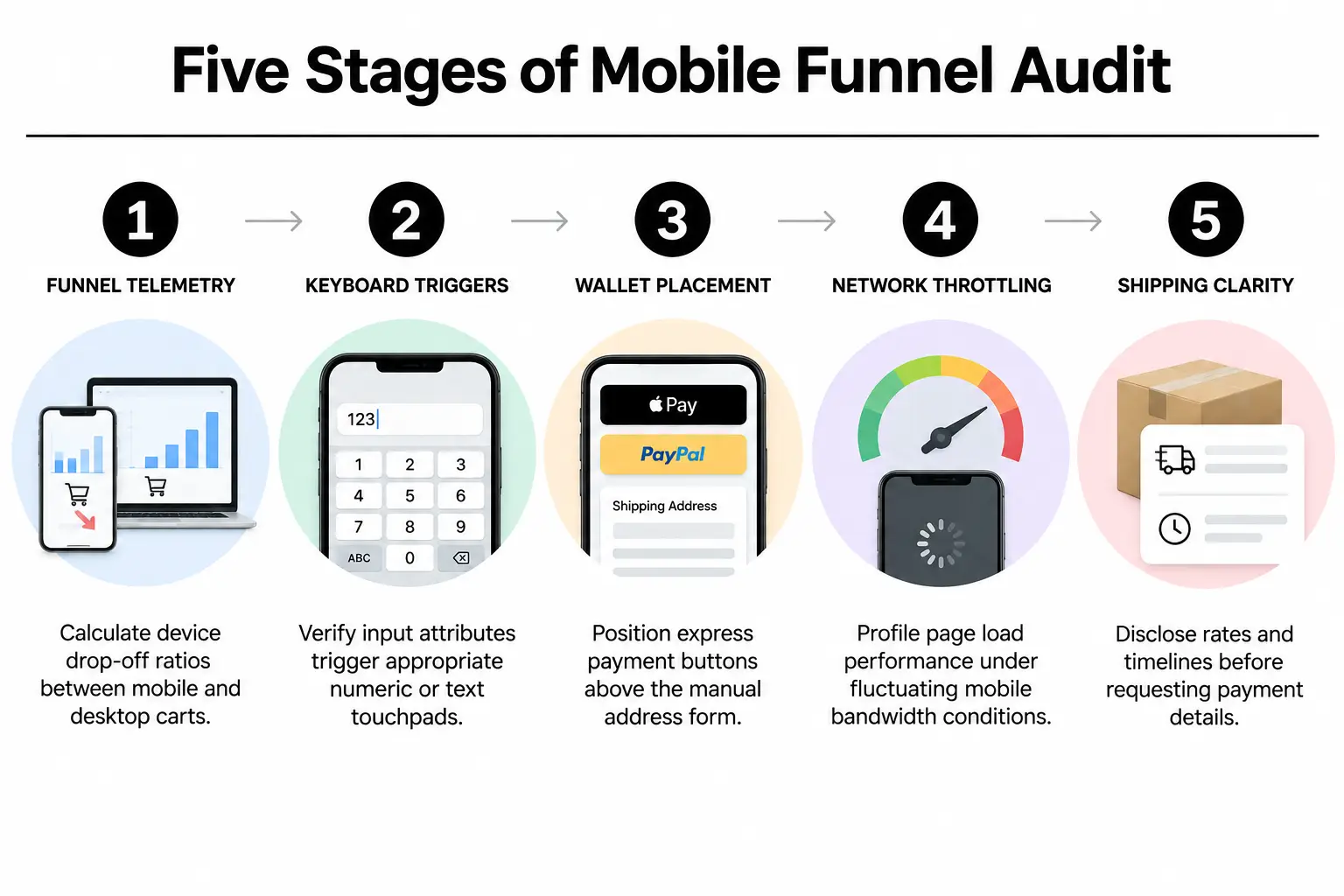
- Compare drop-off by device: Check the percentage of desktop carts that become purchases against the mobile rate. A mobile completion rate more than twenty percent behind desktop points directly to a layout or payment gateway failure.
- Check which keyboards open: Load each checkout screen on iOS and Android phones. Postal code and card fields should open numeric keypads. Email fields should open keyboards with a visible at-symbol so shoppers don’t have to switch layouts.
- Check express wallet placement: Confirm that Shop Pay, Apple Pay, and Google Pay appear without scrolling on mobile screens. Putting these buttons below manual address fields defeats their purpose: saving buyers the work of entering those details.
- Measure mobile load times: Test Core Web Vitals, Google’s page experience measures, with Google’s page speed tool using simulated slow 4G settings. Read about our page speed checks to find third-party scripts that delay the first checkout screen.
- Review shipping costs and timing: Make sure estimated delivery times and carrier rates appear before the final billing step. Surprise surcharges on the payment screen send buyers straight out of the cart.
Settling the Theme Architecture Question Early
Before changing templates, check if your store uses older Shopify Liquid templates or newer app blocks. Modern stores with tailored Shopify design can use native checkout extensions without rewriting the rules behind the store. For deeper problems found during the audit, schedule an audit review so we can map out the template changes needed.
Comparing Mobile Checkout Architectures for Growing Catalogs
Your store’s setup should reflect how it sells and ships products. Standard retail orders have different needs from subscriptions or orders with complex local shipping rules. Shopify offers several ways to handle mobile checkout. Picking the right technical setup now helps avoid rebuilding it as your catalog grows.
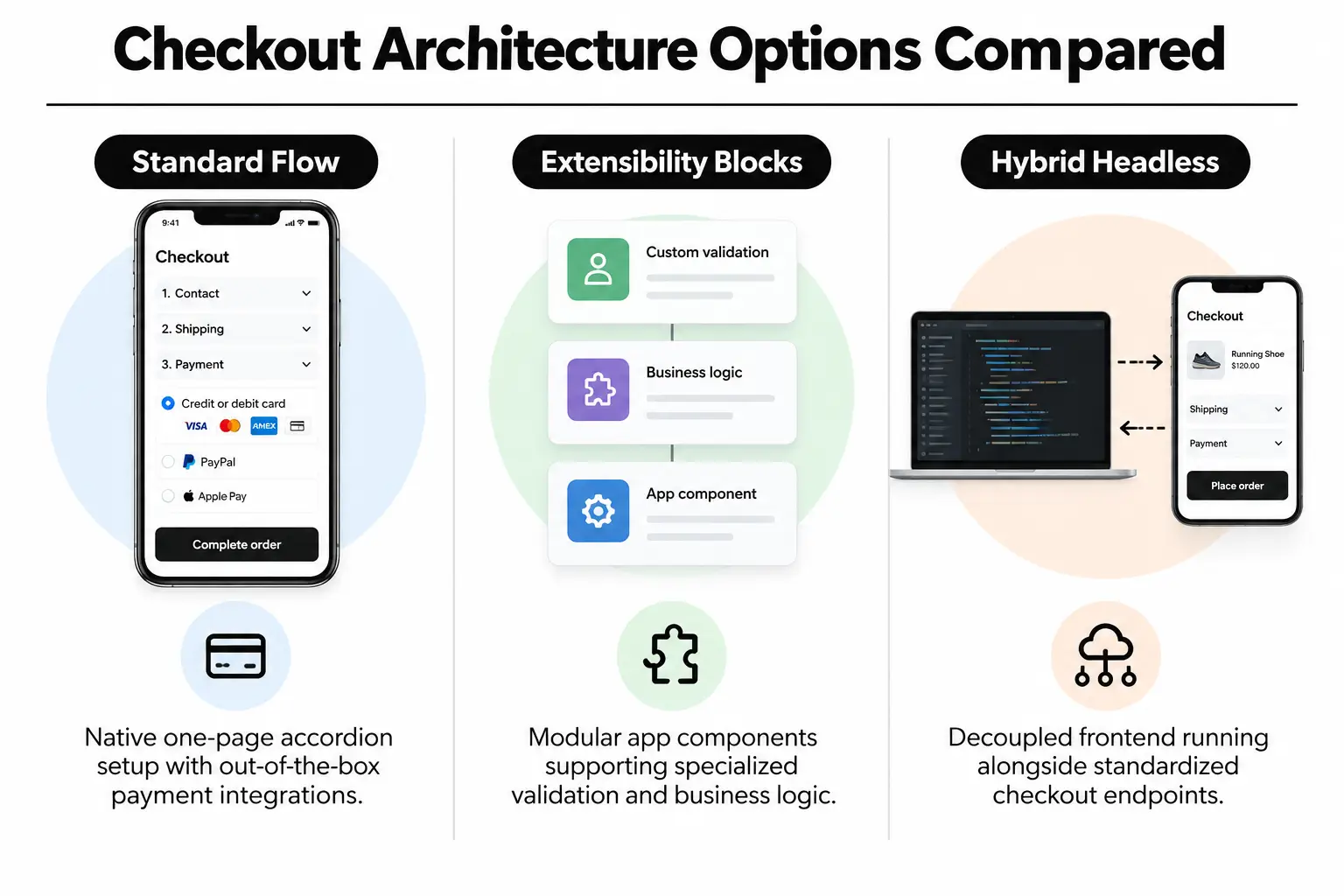
Standard Native One-Page Checkout
Shopify’s default one-page checkout groups shipping, billing, and order details into sections that expand and collapse. It works reliably without custom development and includes Shop Pay support. High-volume stores may still run into limits, though. Custom loyalty programs or specific local pickup rules can need more flexibility than the standard settings offer.
Custom Checkout Extensibility
For Shopify Plus stores, Checkout Extensibility replaces the older checkout.liquid file with app-based changes. Developers can add custom delivery dates or gift messages through app blocks. Customer verification is another option. These blocks preserve checkout security and speed while keeping the code compatible with Shopify’s platform updates.
Dedicated Headless and Multi-Platform Integrations
Some businesses pair Shopify’s checkout engine with a custom storefront, a setup called headless commerce. Others run hybrid stores alongside wholesale systems built through Magento development. This gives them full control over the interface. It also requires ongoing developer support and responsive web design to keep payment connections working across operating systems.
| Option | Best for | Watch out for |
|---|---|---|
| Standard one-page checkout | Catalog stores that need a stable checkout without extensive development work. | Limited room for custom field checks or local delivery rules that change by order. |
| Checkout Extensibility blocks | Stores that need custom checkout fields, B2B tax checks, or tailored upsells. | Requires custom React development and strict compliance with Shopify’s API rules for software connections. |
| Hybrid headless storefront | Retailers selling across channels who pair content management platforms with Shopify checkout. | More maintenance and complex transfers of shopper sessions from storefront to checkout. |
Tactical Form and Wallet Adjustments That Protect Revenue
Small form details deserve close attention during checkout testing. A field that’s merely awkward with a mouse can stop a purchase on a phone. Making forms easier to use directly increases completed orders, so don’t dismiss these changes as cosmetic work.
Form Optimization and Field Behavior
Every field should make the next step clear. Following the mobile standards from the World Wide Web Consortium keeps forms accessible and efficient for all users, including people who need help interacting with a touchscreen.
- Enable browser autofill: Use standard HTML autocomplete tags on address fields. These tell the browser what each field needs, letting shoppers fill in a shipping address with one tap.
- Collapse coupon code fields: Put the discount box behind a small dropdown link. A prominent, open coupon field encourages buyers to leave the store and search for a code.
- Use one address checkbox: Make the billing address match the shipping address by default. That removes duplicate typing for over ninety percent of buyers.
Accelerated Payment Gateways
Typing card details is the weakest part of mobile checkout. One-tap payment options let shoppers skip standard address forms altogether, rather than struggle through them on a phone.
- Show the right wallet: Make Apple Pay and Google Pay appear based on the browser and device the customer is using.
- Set up Shop Pay recognition: Returning shoppers from the wider Shop Pay network can confirm orders with SMS codes instead of entering card numbers again.
Design standard: Keep promotional banners and navigation menus out of mobile checkout, along with unlinked footer items. Once checkout begins, remove every exit except completing the order.
Checkout cleanup belongs at the center of any website redesign scope. Good interface design makes the purchase process easier to use and brings immediate returns without requiring you to spend more on attracting traffic.
Production Milestones, Rollout Timing, and Cost Factors
Active orders must keep moving while checkout changes are built. Teams test each change in a sandbox, an isolated test environment, before releasing it to customers. The rollout below shows how professional web development teams divide the work, who handles each phase, and how much time to allow:
| Phase | What happens | Who handles it | Typical timing |
|---|---|---|---|
| Checkout tracking review | Review tracked events and error logs. Check device-level drop-offs in Shopify Analytics. | Analytics lead | 3 to 5 business days |
| Test setup | Set up express payment buttons and remove needless fields. Build blocks for custom input checks. | Frontend engineer | 1 to 2 weeks |
| Device testing | Test purchases on different phone screen sizes and cellular networks. Check each payment method. | Quality assurance specialist | 3 to 4 business days |
| Live release | Release the checkout theme changes during low traffic and watch live purchase completion rates. | Lead developer | 1 business day |
Costs depend on the store’s complexity. Basic theme changes and wallet setup cost less than custom Checkout Extensibility apps. Complex B2B rules or headless integrations also need more development work. Careful Shopify development keeps that work tied to your digital marketing goals without making the store harder to keep running reliably.
Clear Answers on Mobile Drop-Off Reduction
Does switching to Shopify’s one-page checkout automatically eliminate abandonment?
No. Changing the layout won’t fix the problems underneath it. Unnecessary tracking scripts can still slow checkout, and hidden shipping rates still drive buyers away.
Missing express payment options leave more typing to do. Pair the new layout with fewer form fields and digital wallets that speed up payment.
How significantly do digital wallets improve mobile transaction rates?
Express options such as Apple Pay, Google Pay, and Shop Pay can bring checkout time below twenty seconds. Buyers don’t have to type their card numbers or shipping addresses. Removing that manual entry clears the main obstacle to completing a purchase on a phone.
Can regular website maintenance protect checkout performance?
Regular website maintenance prevents failures from outdated apps or broken software connections, known as API endpoints. It also catches conflicting JavaScript tags. Routine checks keep payment gateways and tracking scripts working properly without slowing mobile checkout.
When should an online business choose Shopify over other e-commerce platforms?
For consumer retail brands, Shopify offers a very dependable mobile checkout. Businesses with complex catalogs or wholesale pricing across several warehouses may need more flexibility. Those with heavily customized publishing workflows may also find a better fit in custom WordPress sites or dedicated Magento development.
How does thoughtful ui ux design reduce shipping address errors?
Thoughtful form design reduces typos through automatic postal code lookups and clear messages about invalid entries. Opening the right smartphone keyboard helps too. Together, these choices prevent rejected form submissions that frustrate buyers and make them leave the store.
Strengthening Your Digital Storefront in Rancho Palos Verdes
Our branding agency is based in Rancho Palos Verdes, CA. At Prozco Branding, we improve store structure and payment flows so customers can finish buying. That work protects your marketing budget and steadies sales. We provide web design alongside store development, with technical support for the checkout as well as the rest of the site.
We work with merchants operating commercial facilities throughout Rancho Palos Verdes, from the homepage through final payment. To have your mobile checkout checked for barriers to buying, contact our team at the Seagate Drive office.